Creative Communities of the World Forums

The peer to peer support community for media production professionals.

Activity Forums Maxon Cinema 4D Segment size change

  • Segment size change

    Posted by David Hague on October 1, 2023 at 12:38 am

    If I have say created a cube with x,you,z segments being 3, 3 and 3, then make editable (C), how can I then change a segment size after doing a loop selection You used to be able to enter that nu ber in Object Properties but no more (or I cannot find d it)

    David Hague replied 2 years, 9 months ago 2 Members · 3 Replies
  • 3 Replies
  • Kouraib Abdmalek

    October 1, 2023 at 8:16 am

    Hi David,

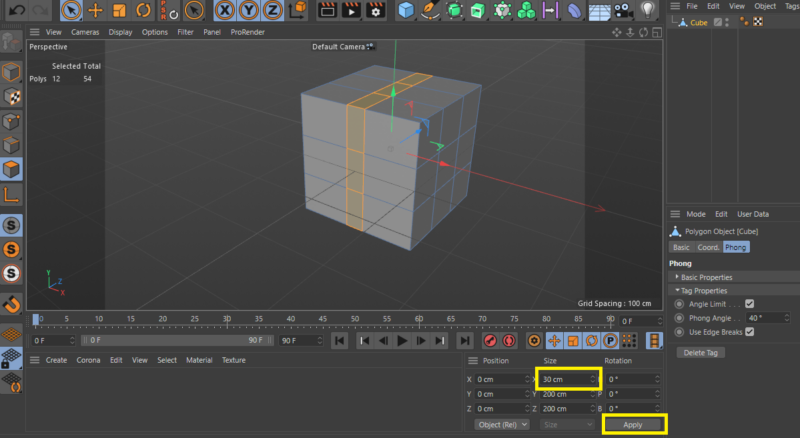
    after you make the model editable you find the size in the panel under the viewport so you modify the size and then click apply just make sure that you turn the mode to “model” like in the screenshot below.

    hope that will help

    thanks

  • Kouraib Abdmalek

    October 1, 2023 at 11:05 am

    If you mean that the number of segments in the cube was 3 on each side, then you make a loop selection and now you want to change the dimensions, then in the same way as before, you go to the panel below and change the values. You will find two equal values that control the protrusion and atrophy of the segments and other different values that control the width of the selection area as in the screenshots below. I hope I understand well what you are looking for, if there is anything else I will be happy to help you

  • David Hague

    October 2, 2023 at 2:29 am

    Thank you. The problem is caused by the “new” interface I think. I have found a solution by also having open the “Coordinate” window – these are the number I need that disappear from the “Attributes” window the moment an object becomes editable.

We use anonymous cookies to give you the best experience we can.
Our Privacy policy | GDPR Policy