Creative Communities of the World Forums

The peer to peer support community for media production professionals.

Activity Forums Maxon Cinema 4D mesh edit to a volume by stitching?

  • mesh edit to a volume by stitching?

    Posted by Hans Castrop on August 10, 2023 at 6:22 pm

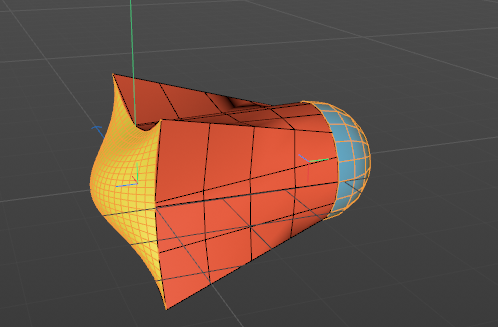
    This is not about volumetric mesh… but I’ve got a question about basic workflow. I’ve got a maskshape, so not a watertight object but a shaped surface. I’d like to make that a closed object. How can I connect this maskshape to for instance a hemisphere? Both objects have different amount of vertices. (I hope this makes sence).

    thanks

    Hans

    Kouraib Abdmalek
    replied 2 years, 9 months ago
    4 Members · 3 Replies
  • 3 Replies
  • George Charoupas

    August 11, 2023 at 8:49 pm

    Hello Hans,

    I don’t understand exactly your issue. Maybe showing some photos or uploading a cinema 4d file can help to better demonstrate what you want to achieve.

  • Andy Kiernan

    August 13, 2023 at 4:33 pm

    If I understand right, you want to connect two objects, for example, a disc shape and a tube shape…

    The first way is to just do it by hand, modeling, stitch and sew, polypen etc… since the point counts don’t match it could be involved. The first step is to select both objects and combine them into 1 object. Then move on to welding the points together.

    Another way could be to use the volume mesher, add both objects and move them into place, this will mesh them together, it will create a high poly mesh but you could use the Z remesher. It may get you close to where you want to be.

    Another way, although this would only work in some situations, could be, to extrude your ‘mask shape’ then use that to boole the second shape so the cut takes on the masks form. But again that is likely only to work in limited places!

    Share a file and I’m sure someone can help

    Cheers

    AK

  • Kouraib Abdmalek

    August 16, 2023 at 3:35 pm

    Hi Hans,

    if you are talking about doing something similar to the screenshot below, just let me know and I will tell you how to do it

    Thanks

We use anonymous cookies to give you the best experience we can.
Our Privacy policy | GDPR Policy