Creative Communities of the World Forums

The peer to peer support community for media production professionals.

Activity Forums Adobe Photoshop Imported text nightmare

  • Imported text nightmare

    Posted by John Mendelsohn on May 25, 2023 at 2:36 pm

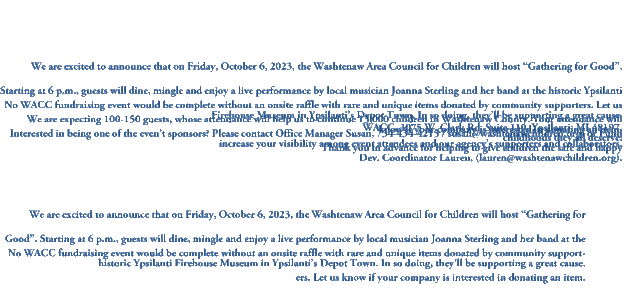
    When I import text (from both Word or Pages, in eithr of their proprietary formats, or as Plain Text or RTF), the vertical spacing is weird. Half of paragraph 3 will be superimposed on the bottom of paragraph 2, and when I try lower it manually, bu placing the cursor at the beginning of Paragraph 3 and hitting RETURN, the text actually goes up, rather than down!

    I’ve tried the EDIT > Paste without formatting, but to no avail.

    Biju Toha replied 2 years, 11 months ago 3 Members · 2 Replies
  • 2 Replies
  • Hector Vera

    May 26, 2023 at 6:44 pm

    May I ask if each of these paragraphs are different text layers? I imagine you are trying to seperate the paragraphs so they can be read clearly right? If so, using the move tool to move the other paragraph down can help. Would also help if I can see a video clip of the exact issue. This does look strange indeed!

  • Biju Toha

    May 29, 2023 at 4:29 am

    If you are importing a lot of text, you may want to use the “Import Options” dialog box to specify how the text is imported. For example, you can select the text’s font, size, and color.

We use anonymous cookies to give you the best experience we can.
Our Privacy policy | GDPR Policy