


Learn What’s New in the Adobe Premiere Pro February 2023 Update

The 23.2 update of Premiere Pro includes important fixes, optimizations, and user-requested improvements, like automatic tone mapping for HDR media. This update is recommended for all users. Learn about best practices for updating Premiere Pro.
Automatic tone mapping
New in Premiere Pro, automatic tone mapping makes it easy to work with different types of footage and different color spaces in the same sequence. Mix and match camera media, from Log footage to iPhone HLG and other HDR formats in rec709 (Standard Dynamic Range) sequences, while retaining consistent colors. With automatic tone mapping, there’s no more risk of clipping your highlights.
Premiere Pro automatically adjusts wide color gamuts to display accurately in your sequence without blown-out highlights. Tone mapping is enabled by default, so iPhone or HDR footage will display correctly.


Automatic tone mapping adjusts for three different types of footage:
- iPhone HLG
- Log-based video, like Panasonic Log, Sony S-Log, Canon Log.
- Other HDR formats (such as HLG color space)
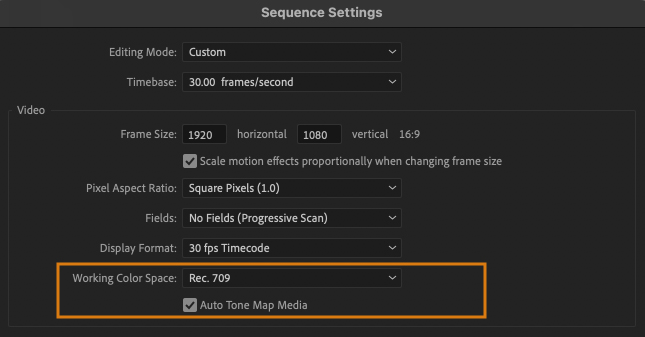
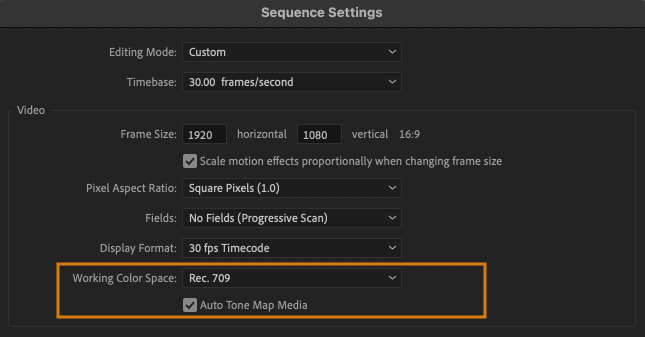
Automatic tone mapping is on by default. You can turn it off or on in your Sequence settings.
To work with log footage, enable Auto Detect Log Video Color Space. If you are working in an HDR sequence, tone mapping automatically converts your log footage into HDR.
Learn more about tone mapping in Premiere Pro.
Sequence Locking for offline editing
Edit a team project anywhere you need to work. If there’s no internet available, Premiere Pro saves your changes locally as a copy of the sequence. Check in your edits when you’re back online using the Publish button.
Whenever you are working on a team project, an icon in the header bar and badges on media in Project panel indicate when you are offline.
In the event two or more collaborators edit the same sequence offline, the first user to come back online will have the option to publish their changes to the team project. Other collaborators will be warned of the conflict once they reconnect to the internet, and they will have the option to publish their work as a new sequence, available to everyone in the project.
Learn more about Sequence Locking for offline editing.
New language support in Speech to Text
Captioning videos is now more accessible in Premiere Pro, with Speech to Text now available for even more users worldwide.
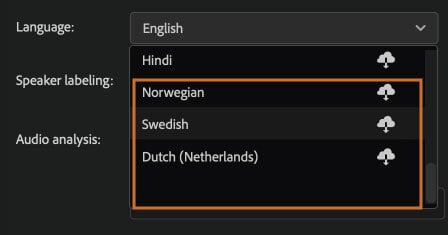
Newly supported languages include Dutch, Norwegian, and Swedish. Speech to Text in Premiere Pro is now available in 16 languages.
Learn how to download language packs for Speech to Text in Premiere Pro.
Reset options at launch
Use the new reset options at launch in Premiere Pro to do regular maintenance and clean up of your system before updating to a new version of the app or to diagnose and troubleshoot app issues.
To access the reset option, click on the Premiere Pro icon, then immediately press and hold Cmd (macOS) or Ctrl (Windows) while launching. When the Reset options dialog appears, check the boxes next to the actions you want to take.

The advantage of this new panel is that it groups common troubleshooting tools in one place. If any of these steps are new to you, learn more about Reset preferences in Premiere Pro and Managing the Media Cache.
Previously, deleting the plugin cache or bypassing third-party plugins were manual processes. With these new options, Premiere Pro performs these actions for you.
The next timeyou relaunch Premiere Pro normally, the plugin cache is rebuilt, and third-party plugins are enabled.
Learn more about these and other best practiceswhen updating to the latest version of Premiere Pro.
Related COW News
###
Enjoying the news? Sign up for the Creative COW Newsletter!
Sign up for the Creative COW newsletter and get weekly updates on industry news, forum highlights, jobs, inspirational tutorials, tips, burning questions, and more! Receive bulletins from the largest, longest-running community dedicated to supporting professionals working in film, video, and audio.
Enter your email address, and your first and last name below!

Responses