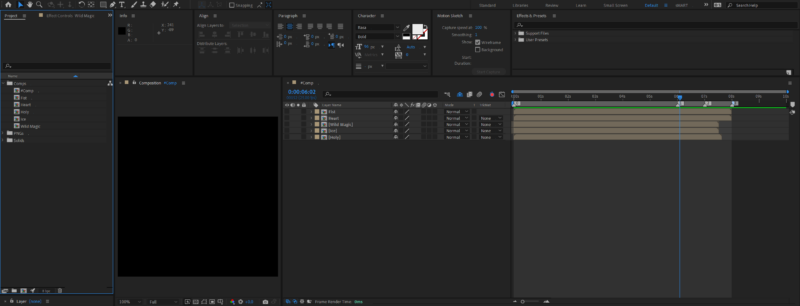
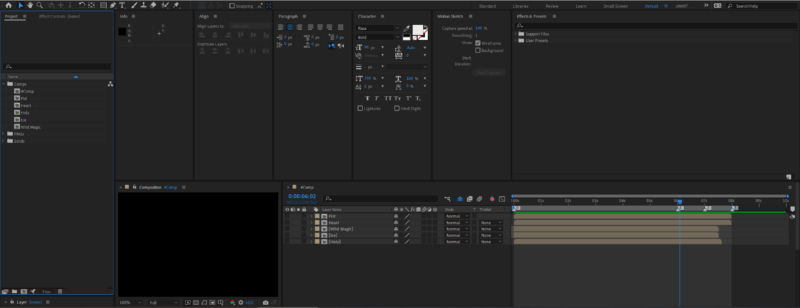
Activity › Forums › Adobe After Effects › Timeline not keeping her workspace bounds Adobe After Effects Timeline not keeping her workspace bounds Posted by Martin Dumas on January 25, 2023 at 3:09 am The first picture is the layout when I save the workspace.The second picture is when the workspace is loaded. Any idea what causes this and how to fix it ?Either via UI, or maybe by modifying the XML workspace file ? Chris Voelz replied 3 years, 3 months ago 3 Members · 3 Replies 3 Replies Eric Santiago January 25, 2023 at 2:34 pm Try moving/removing some panels and see what happens. Windows right? Always had that issue in W7. I work mostly in OSX and W10/11 now. Martin Dumas January 25, 2023 at 7:38 pm Windows 10. I tried pretty much everything (changing panel properties such as “stacked panel”, inverting position of all the panels, etc), but to no avail 🙁 Chris Voelz January 26, 2023 at 4:44 pm It looks like you are trying to save over the Default workspace. Usually when I have issues with workspaces saving as a new one typically fixes it. “Save as New Workspace…” instead of “Save Changes to this Workspace” Reply to this Discussion! Login or Sign Up Public All Members My Connections Only Me PublicAll MembersMy ConnectionsOnly Me Public All Members My Connections Only Me Reply to this Discussion! Login or Sign Up