Creative Communities of the World Forums

The peer to peer support community for media production professionals.

Activity Forums Adobe After Effects No video after render, only black screen and audio

  • No video after render, only black screen and audio

    Posted by Gerald Hapeman on December 6, 2022 at 4:58 pm

    I render/export using Quicktime, Pro Res, H.264, and various other methods to get a 3-minute animation into a video playback format. One render took over nine hours and ended up failing (using the new HEVC settings). But all the others, even trying cutting the renders in half, I still get a black screen playback but audio is fine. At the start of every video playback, in the rendered out video, I get a MISSING CODE ERROR message as I pasted below. I tried basic rendering and rendering out of AEM, but still the same issues. Frustrating.

    2022 AE has many new bells and wonderful whistles, and I am sure I am missing something, as I have been using an old version (2018 or so) and only upgraded recently, and haven’t animated in some time, so I am assuming I am missing some step. I used to just be able to simply hit the render que and was off and running in the older versions, but 2022 has me confused.

    Now, I will say this… Of those rendered videos that have no imagery but do have sound, I have opened up in Photoshop and I do get to see the imagery and hear sound. I render/export out of PS and what do u know, the imagery and audio works!! So, I will and can continue down this extra step/path if I must, but wondering, what is the issue I am having with AE’s render machine?!! I will say that my animation uses a lot of Adobe-Video Stock and various related other video stock art (animation documentary) within it, but can that be the issue? It still rendered fine in PS. MANY THANKS!!!l
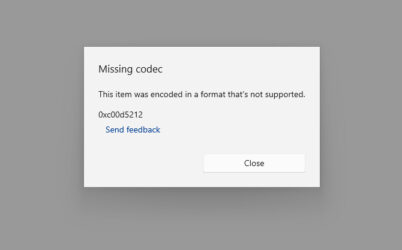
    Chris Voelz replied 3 years, 6 months ago 2 Members · 4 Replies
  • 4 Replies
  • Chris Voelz

    December 6, 2022 at 5:11 pm

    If you are using Window Media Player this is a common occurrence. Install VLC, it has better support for video codecs. If you are getting audio only this is almost always a video codec issue. Equally so using VLC will fix it.

    https://www.videolan.org/vlc/

    If you are sending the render to Media Encoder, try changing the render engine.

  • Gerald Hapeman

    December 6, 2022 at 10:22 pm

    Yeah – I’ll give that one a try too and see if that helps — THANKS!!

  • Gerald Hapeman

    December 7, 2022 at 2:23 am

    Incredible!! That solved it! Thank you kind sir…

    BUT, if I may… I noticed that the video playback is a little dark in the beginning for some reason. Is there a tweek to the software videolan? Its not dark on the AE file, so just wondering…

  • Chris Voelz

    December 7, 2022 at 4:23 am

    Try setting your color working space to sRGB 2.1 and tick the box on for “Compensate for Scene-referred Profiles”. You will find that in the Color tab in Project Settings. There is a slight gamma shift when exporting to .mov files. You can read about that by googling it. No real way to fully compensate for it except with those setting I mentioned. It should at least match better what you have in AE to VLC. This is if your color is off slightly throughout the video. If its just the beginning section it could be something in your project.

We use anonymous cookies to give you the best experience we can.
Our Privacy policy | GDPR Policy