Creative Communities of the World Forums

The peer to peer support community for media production professionals.

Activity Forums Adobe After Effects Expressions Calculate the size of an rotated rectangle to be exactly at the comp borders

  • Calculate the size of an rotated rectangle to be exactly at the comp borders

    Posted by Robert Müller on November 29, 2022 at 7:28 pm

    Hi, this may be more of a math problem but im totally stuck, Ill try to explain:

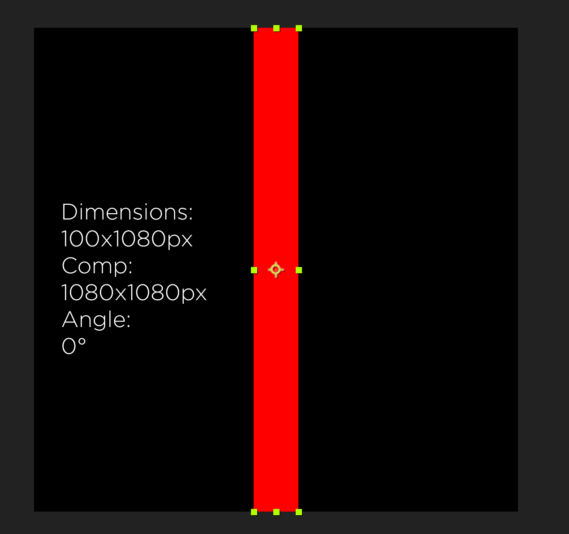
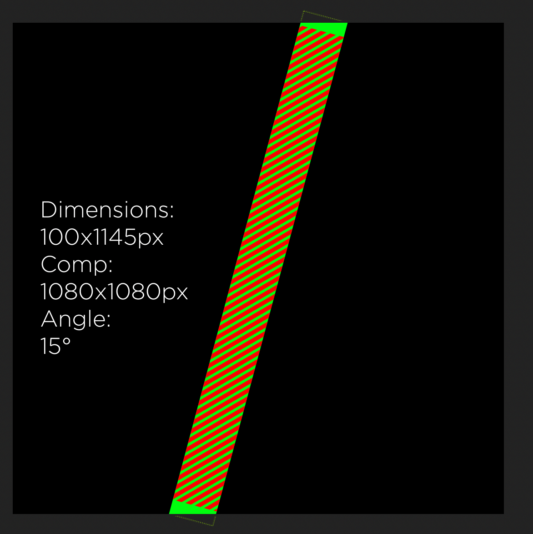
    I have a comp (1080 by 1080) containing a rectangle with a width of 100 and a height of 1080. So at zero degrees the rectangle fits perfectly in the comp. Now i want to rotate the rectangle and while this happens the height should adjust, so that the rectangle is always at the edge of the comp ( not completely inside, so that one corner always overlaps). The value must be precise here so i cant start with an arbitrary long rectangle with most of the rectangle being hidden by the edge of the canvas.

    Through some trial and error I got that the height of the rectangle at 15 degrees should be around 1145 pixels, but I cant figure out why. Ive attached two screenshots to illustrate the problem (the red hatched area in the second pic is the original rectangle of 1080px height). Is there some way to calculate this using sin or cos? Because I couldnt get it to work 🙁

    Filip Vandueren replied 3 years, 5 months ago 3 Members · 4 Replies
  • 4 Replies
  • Dan Ebberts

    November 29, 2022 at 8:33 pm

    I think this will work as long as you don’t go past 48 degrees or so (not sure if that’s an issue):

    a = degreesToRadians(rotation);
    len = (thisComp.height/2)/Math.cos(a) - (value[0]/2)*Math.tan(a);
    [value[0],len*2]
  • Dan Ebberts

    November 29, 2022 at 9:58 pm

    I think I read the question wrong. I think it would be like this (and would only be good up to about 40 degrees):

    a = degreesToRadians(rotation);
    len = (thisComp.height/2)/Math.cos(a) + (value[0]/2)*Math.tan(a);
    [value[0],len*2]
  • Dan Ebberts

    November 29, 2022 at 10:04 pm

    Actually, this version should work from -41 to +41 degrees:

    a = degreesToRadians(rotation);
    offset = (value[0]/2)*Math.tan(a);
    len = (thisComp.height/2)/Math.cos(a) + (a < 0 ? -offset : offset);
    [value[0],len*2]
  • Filip Vandueren

    November 30, 2022 at 9:50 am

    Hi Robert and Dan,

    after a bit of experimenting with Dan’s code, I think this one works for any angle (although still only for square compositions) and any width (up to the width of the comp of course):

    halfwidth = value[0]/2;
    compdiagonal = Math.sqrt((thisComp.width/2)**2 + (thisComp.height/2)**2);
    criticalAngle = 45 - radiansToDegrees(Math.asin(value[0]/2/compdiagonal));
    r=((Math.abs(rotation)+45)%90)-45;
    if (Math.abs(r) < criticalAngle) {
    a = degreesToRadians(r);
    offset = halfwidth*Math.tan(a);
    len = (thisComp.height/2)/Math.cos(a) + (a < 0 ? -offset : offset);
    [value[0],len*2];
    } else {
    a=degreesToRadians(Math.abs(Math.abs(rotation%90)-45));
    len = 2 * compdiagonal * Math.cos(a);
    [value[0],len];
    }

We use anonymous cookies to give you the best experience we can.
Our Privacy policy | GDPR Policy