Creative Communities of the World Forums

The peer to peer support community for media production professionals.

Activity › Forums › Adobe After Effects Expressions › How it is done? Sliders to control Time Remaps first and last key frame?

  • How it is done? Sliders to control Time Remaps first and last key frame?

    Posted by Roy Family on November 22, 2022 at 1:46 pm

    I’m doing a mogrt-template for editor to use in premier, I feel like I know how to do that.

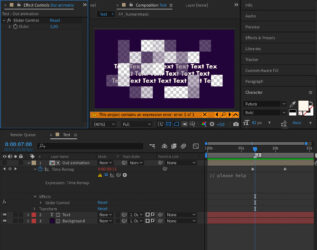
    The comp has text and other elements each having individual in-animations. The out-animation is controlled by one precomp as a track matte.

    I would like that editor has an option to make the animation longer/shorter with a slider controller. Only way I can think of this to be done is to somehow control the first and last keyframe of Time Remap. But everything i try is not working. Is it even possible?

    The pic has very simplified version of the setup


    Dan Ebberts
    replied 3 years, 10 months ago
    2 Members · 1 Reply
  • 1 Reply
  • Dan Ebberts

    November 22, 2022 at 6:28 pm

    There are a number of different options. One would be to use the slider to set the duration of the out animation, like this time remapping expression:

    dur = effect("Slider Control")("Slider");
    t1 = key(1).time;
    t2 = t1 + dur;
    v1 = key(1).value;
    v2 = key(2).value;
    linear(time,t1,t2,v1,v2)

We use anonymous cookies to give you the best experience we can.
Our Privacy policy | GDPR Policy