Creative Communities of the World Forums

The peer to peer support community for media production professionals.

Activity Forums Adobe After Effects Extrusion with perpective

  • Extrusion with perpective

    Posted by Egil Arntzen on November 5, 2022 at 4:25 pm

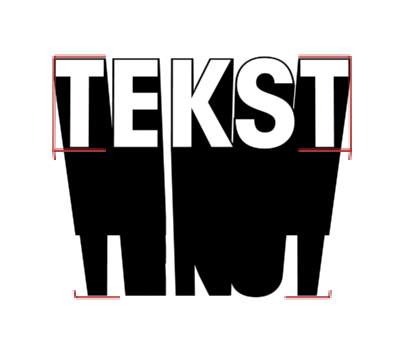
    Trying to recreate this look from Illustrator in AE. I need to do it from scratch in AE so I can animate it. So I got the extrusion at max, but there is no perspective setting in AE like in Illustrator. I tried tweaking with some camera settings, but no luck… Any ideas how to do this? Thanks.

    Egil Arntzen replied 3 years, 8 months ago 2 Members · 4 Replies
  • 4 Replies
  • Filip Vandueren

    November 5, 2022 at 6:43 pm

    Hi Egil,

    since this is a “true 3D” extrusion and not just an effect, you will either need to make your camera’s lens/zoom more wideangle and move the camera closer.

    And/Or Make the extrusion effect a very high number (thousands)

    There are other / fake methods of 2D extruding, but they won’t usually give you the shading on the sides of the extrusion.

  • Egil Arntzen

    November 5, 2022 at 7:02 pm

    Thank you for replying.

    Ok I thought I couldn’t go above 1000 on the extrusion, as it stops at 1000 when I am scrolling, but typing *5 got me to 5000 and it looks better.

    Could you screenshot me an example how to increase the wideangle?

  • Filip Vandueren

    November 6, 2022 at 9:39 am
  • Egil Arntzen

    November 6, 2022 at 2:44 pm

    I will try this, thank you Filip.

We use anonymous cookies to give you the best experience we can.
Our Privacy policy | GDPR Policy