Creative Communities of the World Forums

The peer to peer support community for media production professionals.

Activity Forums Adobe After Effects Expressions Adding a text box for “About” button to an After Effects ScriptUI?

  • Adding a text box for “About” button to an After Effects ScriptUI?

    Posted by Vincenzo Imbimbo on September 8, 2022 at 4:38 pm

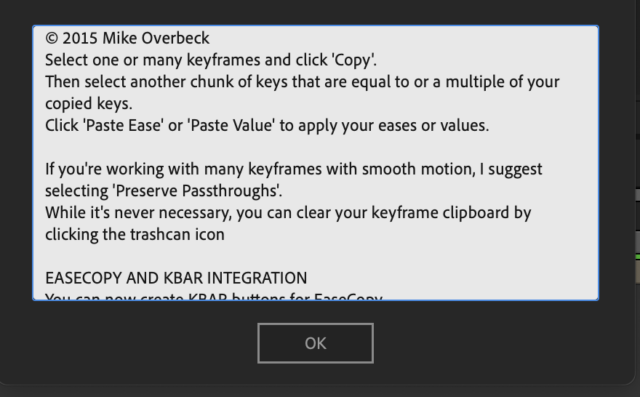
    Hello guys, i’m having trouble adding some text to my “About” window inside ScriptUI, i have seen some scripts that when you click the “?” button it opens up a window and have a white box with text info (link of the script, etc), i have my about window and it opens up a new window but i don’t know how to add that “white box” with text.

    I want something like the attached image.

    This is my code:

    scriptAbout = “all my info with multilines”;

    var aboutWindow = new Window("palette", "About Window", undefined, {resizeable: true, closeButton: true});

    aboutWindow.orientation = "column";

    var aboutOne = aboutWindow.add("group", undefined, "aboutOne");

    aboutOne.orientation = "row";

    aboutText = aboutOne.add("statictext", undefined, scriptAbout);

    Vincenzo Imbimbo replied 3 years, 8 months ago 2 Members · 2 Replies
  • 2 Replies
  • Andrei Popa

    September 13, 2022 at 2:48 pm

    Try this. You can modify the size as you wish.

    scriptAbout = "all my info with multilines";
    var aboutWindow = new Window("palette", "About Window", undefined, { resizeable: true, closeButton: true });
    aboutWindow.orientation = "column";
    var aboutOne = aboutWindow.add("group", undefined, "aboutOne");
    aboutOne.orientation = "row";
    aboutText = aboutOne.add('edittext {size: [372,66], properties: {readonly:true, multiline: true}}');
    aboutText.text = scriptAbout;
    aboutWindow.show()
  • Vincenzo Imbimbo

    September 14, 2022 at 12:31 pm

    Thank you again Andrei, this was exactly what i was looking for!

We use anonymous cookies to give you the best experience we can.
Our Privacy policy | GDPR Policy