Creative Communities of the World Forums

The peer to peer support community for media production professionals.

Activity Forums Adobe After Effects Expressions Script for scale animation with custom interpolation.

  • Script for scale animation with custom interpolation.

    Posted by Smet Kira on August 24, 2022 at 1:23 pm

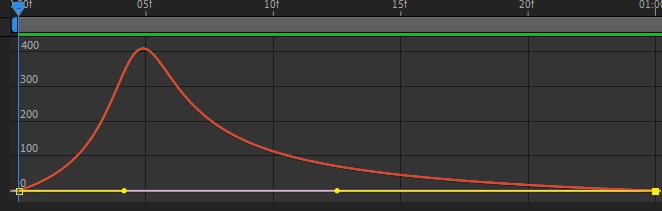
    Hi all. I’m trying to make a script so that when I press a button, 2 keys with such interpolation are created on the Scale parameter of the selected layer. I have such code, but I stumbled on setTemporalEaseAtKey. Help me please. Where am I wrong?


    var myScaleProperty = app.project.activeItem.selectedLayers[0].property(“Scale”);

    var tStartIn = 0;

    var tStartOut = 1;

    myScaleProperty.setValuesAtTimes([tStartIn,tStartOut],[[0,0],[100,100]]);

    myScaleProperty.setTemporalEaseAtKey(1, [0.5]);

    myScaleProperty.setTemporalEaseAtKey(2, [0.8]);


    Smet Kira replied 3 years, 9 months ago 2 Members · 4 Replies
  • 4 Replies
  • Andrei Popa

    August 25, 2022 at 4:51 pm

    Maybe something like this:

    var myScaleProperty = app.project.activeItem.selectedLayers[0].property(“Scale”);
    var tStartIn = 0;
    var tStartOut = 1;
    myScaleProperty.setValuesAtTimes([tStartIn, tStartOut], [[0, 0], [100, 100]]);
    var ease1 = new KeyframeEase(0, 50);
    var ease2 = new KeyframeEase(0, 80);
    myScaleProperty.setTemporalEaseAtKey(1, [ease1]);
    myScaleProperty.setTemporalEaseAtKey(2, [ease2]);

  • Smet Kira

    August 26, 2022 at 12:39 am

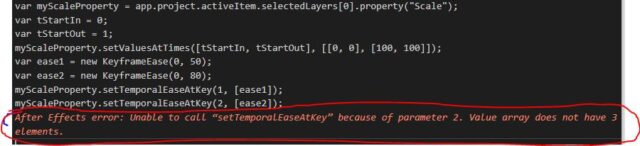
    thanks for the answer! Keys are generated, but they are still linearly interpolated. and same error:

  • Andrei Popa

    August 26, 2022 at 8:45 am

    Sorry, forgot that scale is a 3D property. Try this

    var myScaleProperty = app.project.activeItem.selectedLayers[0].property("Scale");
    var tStartIn = 0;
    var tStartOut = 1;
    myScaleProperty.setValuesAtTimes([tStartIn, tStartOut], [[0, 0], [100, 100]]);
    var ease1 = new KeyframeEase(0, 50);
    var ease2 = new KeyframeEase(0, 80);
    myScaleProperty.setTemporalEaseAtKey(1, [ease1, ease1, ease1]);
    myScaleProperty.setTemporalEaseAtKey(2, [ease2, ease2, ease2]);
  • Smet Kira

    August 26, 2022 at 8:53 am

    It working! thx man for your help! so useful!

We use anonymous cookies to give you the best experience we can.
Our Privacy policy | GDPR Policy