

Activity › Forums › Adobe After Effects Expressions › Quick and simple LipSync
-
Quick and simple LipSync
Posted by Agnaldo de Freitas on June 8, 2022 at 5:02 pmI need to create a lipSync for a character for multiple long vídeos. I’m looking for a way to tie a Mouth Shapes comp to react to keyframes converted from a audio file (Keyframe Assistant).
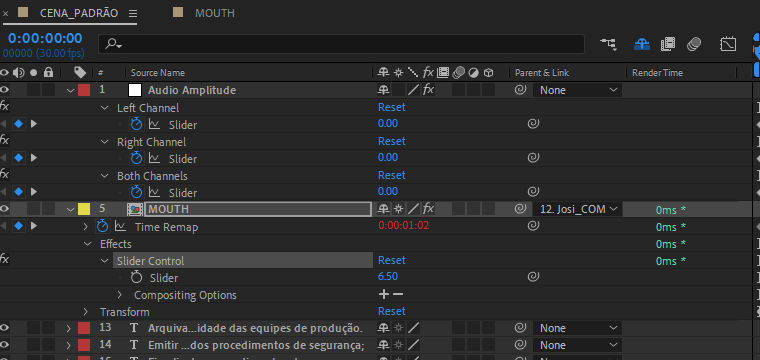
My guess is to create a slider control on the [Mouth Shape] comp and tie this slider to the TimeRemap effect and then make it react to the [Audio Amplitude>Both Channels Slider].
There is probably a better way to do this but as I know jack about coding expressions, I’m in a bit of a pickle.
Any help would be a godsend
 Agnaldo de Freitas replied 4 years, 2 months ago 2 Members · 6 Replies
 -
6 Replies
-

Dan Ebberts
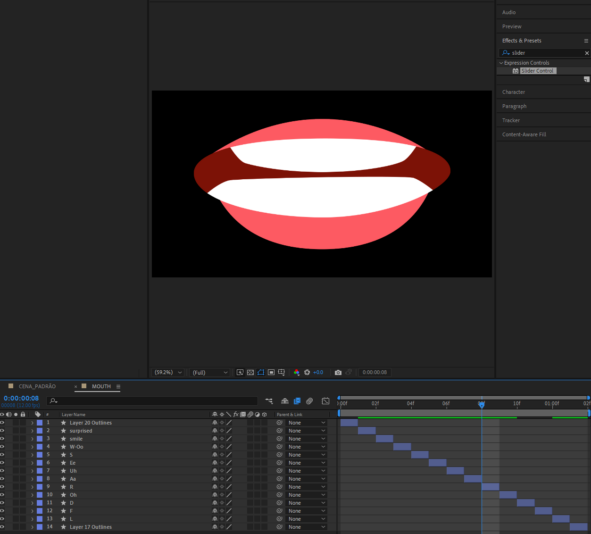
June 8, 2022 at 5:28 pmI think the problem you’re going to run into is that the audio amplitude layer doesn’t contain any phoneme info that you can use to select the appropriate mouth shape. Unless you have some way to extract that info from the audio, you might be stuck with a more manual process. For example, you could use layer markers on your time-remapped MOUTH precomp layer where the comment matches the name of one of the mouth shape layers, and then use a time remap expression like this to display the corresponding mouth shape image:
m = marker;
val = 0;
if (m.numKeys > 0){
n = m.nearestKey(time).index;
if (time < m.key(n).time) n--;
if (n > 0){
idx = comp(name).layer(m.key(n).comment).index;
val = framesToTime(idx-1);
}
}
val
-

Agnaldo de Freitas
June 8, 2022 at 7:09 pmThis kind of video doesn’t require that the lip-syncing is accurate. Just having it reacting to the keyframes generated by the AE should be enough. I managed to find an old tutorial¹ that kind of improved on my guess but it still somehow leaves it to be desired as sometimes the lip syncing seems to be stuck in a mouth shape: https://youtu.be/d4u87GBSVyY
¹ https://youtu.be/c5u9B4Dmqao
Some contents or functionalities here are not available due to your cookie preferences!This happens because the functionality/content marked as “Google Youtube” uses cookies that you choosed to keep disabled. In order to view this content or use this functionality, please enable cookies: click here to open your cookie preferences.
-
Dan Ebberts
June 8, 2022 at 7:28 pmOK, so maybe what you need to do is remap the audio slider range to a range of frames that encompasses your range of mouth shapes. So you’d still time remap the MOUTH precomp layer and apply this expression to time remapping:
n = comp(name).numLayers;
s = thisComp.layer("Audio Amplitude").effect("Both Channels")("Slider");
maxVal = 34;
minVal = 10;
f = linear(s,minVal,maxVal,0,n-1);
framesToTime(f);
Set minVal and maxVal to the min and max audio levels on the slider.
-
Agnaldo de Freitas
June 10, 2022 at 1:11 pmI tried it and it works wonders¹!! THANK YOU!! It does, sometimes, kind of repeat mouthshapes due to similar audio levels. Is it possible to shoehorn a wiggle function in this expression just to cover these situations?
¹https://youtu.be/Yi57N6sZsHA
-
Dan Ebberts
June 10, 2022 at 4:25 pmMaybe something like this:
n = comp(name).numLayers;
s = thisComp.layer("Audio Amplitude").effect("Both Channels")("Slider");
maxVal = 24;
minVal = 0;
avg = (maxVal-minVal)/2;
freq = 5;
w = wiggle(freq,avg) - value + avg;
s = Math.max(s,w);
f = linear(s,minVal,maxVal,0,n-1);
framesToTime(f);
-
Agnaldo de Freitas
June 10, 2022 at 7:31 pmYour first go at this expression went way better: despite it repeating mouth shapes sometimes, it did read pauses consistently. With the wiggle addition, the repetition was removed but it no longer recognized pauses.
Thanks a lott!
Reply to this Discussion! Login or Sign Up