

-
Fx not working no matter what I do
Posted by Rob Lindsay on April 17, 2022 at 6:39 pmI’ve tried the Bypass Button on and off, with and without the Nvidia GPU, restarting, etc.
The track FX and the clip FX have no effect on the image.
I’m using Vegas 13 build 545 64 bit on a windows 10 platform.
Thank you for any help!
Rob Lindsay
Graham Bernard replied 4 years, 3 months ago 3 Members · 13 Replies -
13 Replies
-

Rob Lindsay
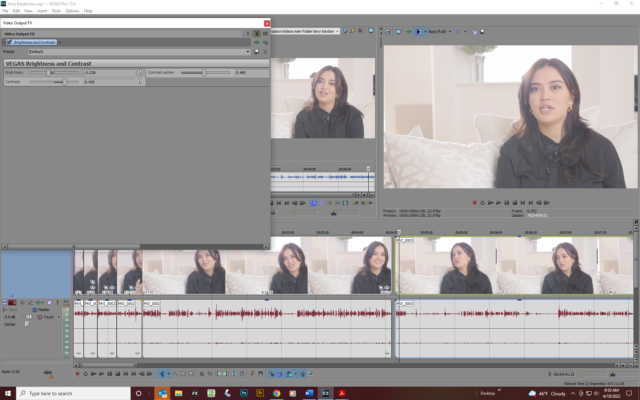
April 18, 2022 at 2:56 pmHere’s a SS, Graham. The FX button is set to Enable. The sliders have no effect on the picture — this is how it came out of the camera. i just want to add a bit of contrast.
Thank you for yur help,
Rob

-

Francois Pénzes
April 18, 2022 at 7:58 pmHi Rob
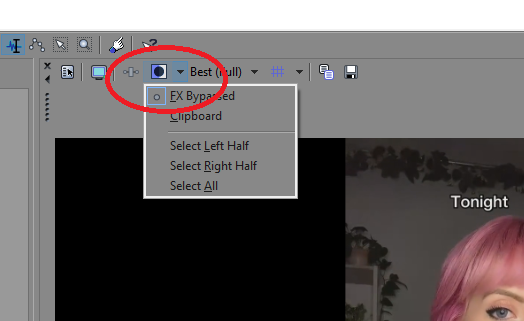
We can’t see your Track Effects window but have you tried un-selecting the FX Bypass in the Split Screen View ?
Cheers !
P.S.: Don’t forget to let us know if that worked or not.
-
Rob Lindsay
April 18, 2022 at 11:53 pmThank you Francois — fiddling around with the FX Bypass dropdown seemed to do the trick, but I don’t know how or why. Even when my buttons were the same as yours in your SS, it wouldn’t affect the picture. But suddenly, it startd to work. I don’t see a direct way to add a SS to show you, or I would.
Can you explain it?
Many thanks,
Rob
-
Francois Pénzes
April 19, 2022 at 12:25 amHi Rob
Happy to know that it prevented you from jumping off a bridge…
But seriously, watch this tutorial from Vegas Creative Software. It should provide you with everything you need to know about that specific feature.
https://www.youtube.com/watch?v=8EUnPyKM1L4&ab_channel=VEGASCreativeSoftware
Cheers !
P.S.: You may want to try adjusting your Levels before playing with Brightness and Contrast.
Some contents or functionalities here are not available due to your cookie preferences!This happens because the functionality/content marked as “Google Youtube” uses cookies that you choosed to keep disabled. In order to view this content or use this functionality, please enable cookies: click here to open your cookie preferences.
-

Graham Bernard
April 20, 2022 at 7:26 amThe FX button is set to Enable.
No, it’s not. In that first SS you’re ENABLING BYPASS – So, that Button ENABLES a bypass of ALL FXing, yeah, I know . . . .
-
Rob Lindsay
April 20, 2022 at 11:37 pmThank you for tutorial tip, Francois — i have watched 6 or so! And I did use levels to adjust the brightness.
graham, clicking on the FX Bypass button seems to change nothing in that drop down menu. Can you show me what it should look like when FX is enabled, please? Also, i dont see how to add a screen shot anymore. Is there a button I don’t see?
Thank yoou,
rob
-
Graham Bernard
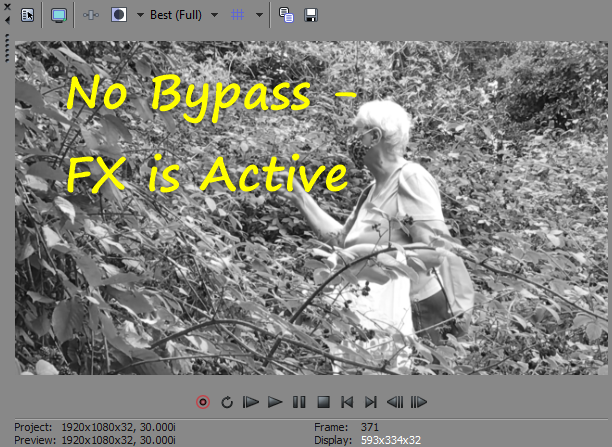
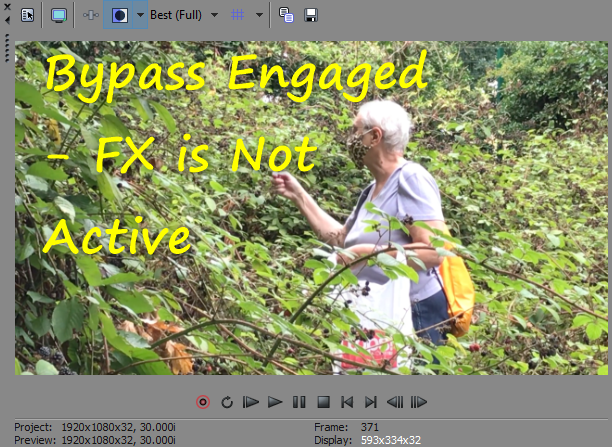
April 21, 2022 at 10:41 amI’m using a VegasPro Black and White FX.
FX Active and Not Active. My Snapshots Functions are working as they should. You can see the Buttons:
-
Rob Lindsay
April 21, 2022 at 6:28 pmThank you Graham. One last request — is there a simple way to upload a screenshot here?
Reply to this Discussion! Login or Sign Up