Creative Communities of the World Forums

The peer to peer support community for media production professionals.

Activity Forums Adobe After Effects How to fix this edge keying issue?

  • How to fix this edge keying issue?

    Posted by Mircea Goia on April 7, 2022 at 8:54 pm

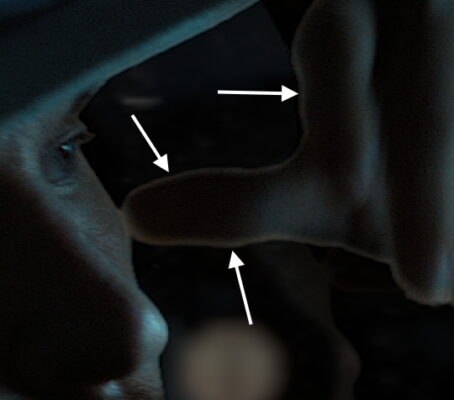
    I keyed a footage (using Keylight) and what’s left is this edge of his hand which is needs to be corrected. Basically, I don’t want to shrink the matte too much. Ideally is to have that edge colored with the color of his hand so the edge won’t be so visible against the dark background.

    How to do it in After Effects with no plugins? (or if I need plugins which one would I need? I tried Red Giant Supercomp and it doesn’t seem to help me much)

    Mircea Goia replied 4 years, 3 months ago 3 Members · 4 Replies
  • 4 Replies
  • Jerard Ghrandem

    April 8, 2022 at 2:13 pm

    My suggestion is to add a Color Key effect, and using the eye dropper tool choose the color of the remaining edge. Then play around with the settings to adjust tolerance, thickness, and feather amount.

  • Chris Wright

    April 8, 2022 at 4:48 pm

    this might be an issue of the intermediate vs final output of keylight. you can take the alpha of intermediate and use that as a secondary alpha matte without losing the color correction of final output. also, if you can refine that, a nice light-wrap does wonders for low chroma information. keying a key sometimes creates a rabbit hole, but maybe jerard’s idea would work in a pinch. it’s hard to say from a still.

  • Mircea Goia

    April 8, 2022 at 5:22 pm

    Here is my scene, if you want to try it out: https://www.dropbox.com/sh/ys4psc4sluw399f/AAD2pdes52iIwZr4aU2Hq1R8a?dl=0

    The videos are 6K and 4K (but I trimmed them down from the original – only 40 frames). in total the files are 2.7 GB.
    As you see, I applied the Keylight and others (Key Cleaner and Spill Suppressor) on a log footage – Scene 7-debugging.mov – (later on I found out that is better to convert to rec 709, do the keying and they eventually use the mattes to key the log footage). Then after I keyed I applied some color correction to the resulting footage. Then i added a background video – PL40105-1274-07-background-debugging.mov.
    Also, as you see, I tried to do the keying in several steps, masking parts of the video and applying Keylight with a bit different settings to each of it.
    The hand I am trying to get it right also has blur from movement.

  • Mircea Goia

    April 13, 2022 at 5:18 am

    I deleted the scene from the download location. I think I managed to find out a solution to my issue. Implies some masking, blurring, blending and such :).

We use anonymous cookies to give you the best experience we can.
Our Privacy policy | GDPR Policy