

Activity › Forums › Adobe Premiere Pro › Network Media Management kicked back -50mv video???
-
Network Media Management kicked back -50mv video???
Posted by Dan Appel on March 18, 2022 at 5:00 pmWe’re baffled by this. We’ve delivered hundreds of spots to our network client, and they just kicked something back for “LOW PEDESTAL -50MV”. It’s green animated type over black video. Is there an option in Premiere that can limit the low end of the MV – whatever the F that is – to 0MV?
Chris Wright replied 4 years, 5 months ago 3 Members · 3 Replies -
3 Replies
-

David Dobson
March 18, 2022 at 8:20 pmMV is millivolts. The Lumetri Color Tool can adjust the black levels. There used to be a broadcast safe effect you could apply to an entire sequence (which just truncated the levels at broadcast levels) but that was back in the age of SD Analog broadcast standards.
If you’ve delivered before without issues, then HOW the blacks got so low is the real issue. Perhaps the color space was changed in Premiere or a black solid used as a background was set to be blacker than the color space.
You don’t say how you delivered the video, but assuming it was by file, it may also be the case that is was imported incorrectly by the client; if someone new was doing the work or they updated their systems, then they may have converted your color space incorrectly, or didn’t convert it, or they converted it when it should have been ignored.
I’d say the first thing is to look at your final video in Premiere using the Lumetri Scopes and see if you also see a sub zero black level. If you don’t, check what color space your working in … and then go from there till you’ve exhausted every possibility. You can ask you client for an updated spec sheet on the premise that maybe it has changed and that might prompt some checking on their side. But the QC people are rarely wrong – it’s all they do — and they have a legit answer for everything – everything except creative.
And a -50MV pedestal might be intentional if the ideas was that the graphics were going to be passed through a luma key (so the graphics could be displayed over picture through a switcher – but that’s more of a video tape operation for live broadcast then for deliverables meant to air as is.)
-
Dan Appel
March 18, 2022 at 10:06 pmThanks David
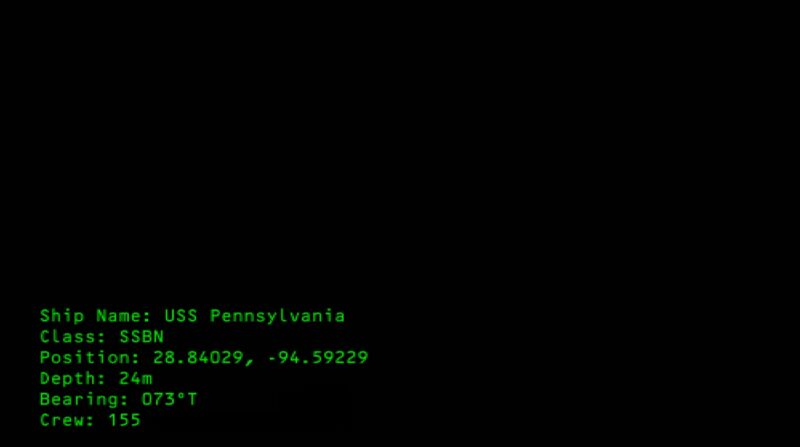
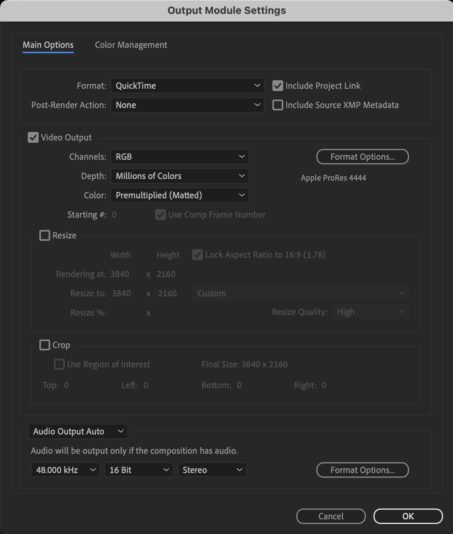
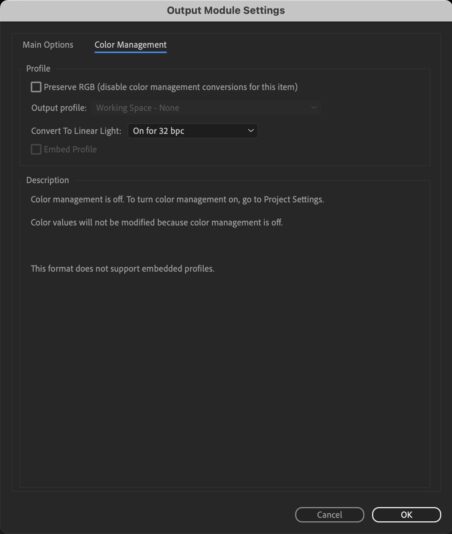
The section is question was an animation output from AE – green type on a “Black Solid” layer that was RGB 0/0/0. I’ve attached screen shots of the animation in question as well as output specs – again nothing out of the ordinary that I’m seeing. Should I just make the black solid RGB 1`/1/1…? So odd.

-

Chris Wright
March 19, 2022 at 2:56 am-50mv Black is 7.5IRE, in NTSC Rec. 709 pixel terms that’s 16 RGB. Since you’re broadcast at NTSC, you should add curves at 16-235 clipping in luminance mode and another layer curves to 240 set as color mode.
The black control doesn’t work the way you’d expect as it works more like a knee than a clip so I always use curves. Other issues such as incorrect metadata of attached colorspace export inside the codec can also confuse the QC, so check mediainfo on what metadata is getting burned in.
Reply to this Discussion! Login or Sign Up