Creative Communities of the World Forums

The peer to peer support community for media production professionals.

Activity › Forums › Adobe After Effects Expressions › need help figuring best method to set minimum size on a dynamic object

  • need help figuring best method to set minimum size on a dynamic object

    Posted by Daniel Negrete on March 15, 2022 at 3:42 am

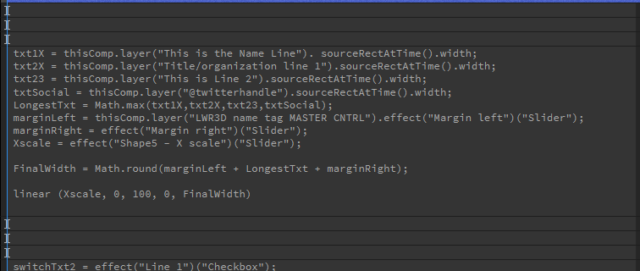
    Ive made a MOGRT LWR3D and the I need to set a minimum width to the BG box. Currently, the width is tied to my margins and whatever the longest line of text is. But the people im making it for dont like the fact it could potentially get really small if someone has a super short name.

    I want to set the minimum length to a specific size but then have the “FinalWidth” expression take over if the longest line + margins of text adjusts to a value over that.

    Ive tried doing if/else statements but im either writing it wrong or an if/else expression is the wrong course of action. Any direction is greatly appreciated.

    attached is a photo of the code. The “FinalWidth” is needed to remap everything for animation purposes.

    Regards,

    D

    Daniel Negrete replied 4 years, 6 months ago 2 Members · 2 Replies
  • 2 Replies
  • Filip Vandueren

    March 15, 2022 at 7:10 am

    I think I would just do:

    longestTxt = Math.max(txt1X,txt2X,txt23,txtSocial, 500);

    then 500 is the minimum ( before adding margins)

  • Daniel Negrete

    March 15, 2022 at 7:39 am

    OMG! That didn’t work as it just adds that number to the longest text (not sure why). BUT! it gave me an idea… I just created a new variable linked to a new text layer that had the character count that would give me the shortest BG shape I needed and then added that variable where you suggested I add the value and hid the text layer! Kinda dirty trick I’m sure there’s a more correct/clean way to do this, but hey it works now! Thanks, Filip for the extra set of eyes!

We use anonymous cookies to give you the best experience we can.
Our Privacy policy | GDPR Policy