Creative Communities of the World Forums

The peer to peer support community for media production professionals.

Activity Forums Adobe After Effects Using Mocha AE with rendered animation

  • Using Mocha AE with rendered animation

    Posted by joshua hart on February 6, 2022 at 1:56 am

    Hi all, lurked around here a lot and have learned so much from the community- I’m running into an issue with Mocha I’m hoping is something simple that I’m over looking-


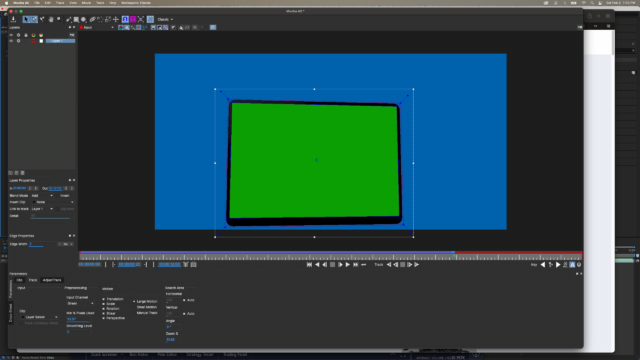
    Doing an animation using rendered footage from my 3D modeling program, a fairly simple tablet scene I want to do a screen replace on. No matter the settings, I can’t get Mocha to track properly. I have pixels set high, all possible tracking options on, zoom enabled, tried luminance and green channels, been at this for like 6hrs and I’m feeling a little crazy haha.


    Here’s a screencap of the track showing settings and issues- thanks in advance from someone still learning so much!


    https://youtu.be/pqBqoguhDfM

    Some contents or functionalities here are not available due to your cookie preferences!

    This happens because the functionality/content marked as “Google Youtube” uses cookies that you choosed to keep disabled. In order to view this content or use this functionality, please enable cookies: click here to open your cookie preferences.
    Henry Garrou replied 4 years, 2 months ago 4 Members · 5 Replies
  • 5 Replies
  • Graham Quince

    February 6, 2022 at 2:11 pm

    Hi Joshua,

    Welcome to the forums!

    Mocha is a planar tracker, which uses dozens/hundreds of points on a surface to calculate a plane. With real footage there’s microscopic clues (pixels changes, light etc…) that it uses. With CG, there’s just not enough information to get a decent track.

    But there’s good news – this is your 3D animation, so you should be able to bypass tracking altogether. What was the 3D package you used to generate the tablet? We should be able to import the camera and plane data directly into After Effects and use that

  • Eric Santiago

    February 6, 2022 at 4:29 pm

    In the old days, I use Maya’s options to pull this off.

    At times I would render a separate screen pass to use as an alpha mask.

    Now I’m not sure what the final results are but in Maya, there is the AE camera tracking option.

  • joshua hart

    February 6, 2022 at 5:07 pm

    Amazing, thanks for helping me understand this- I’m actually using Autodesk’s fusion 360, the modeler I’m most comfortable with…

    I tried adding different decals (tracking markers, etc) to the tablet but in the end just had to manual track it. I don’t think Fusion offers any output possibilities for camera data; the animation space is pretty limited. I need to learn Blender or C4D- I’m just so used to sketch-based modeling (I do architectural design work)

  • joshua hart

    February 6, 2022 at 5:13 pm

    I did render a screen only pass for the alpha mask, but getthing the corner pin data was killing me hahaha. AE’s camera tracker was worse than Mocha for trying to generate that, in the end I manual tracked it. Thank you for the reply!

  • Henry Garrou

    February 10, 2022 at 2:01 pm

    Put a non repeating pattern like a QR code in the center of that Green Screen panel and it will track. Then use a garbage mask to remove the QR code after keying.

    Also, I just export a baked camera from Maya as .ma include some Locators named Null2 Null2 etc for refernce and import the ma into maya.

We use anonymous cookies to give you the best experience we can.
Our Privacy policy | GDPR Policy