

Activity › Forums › Adobe After Effects Expressions › Random speed of animation between two keyframes after effects
-
Random speed of animation between two keyframes after effects
Posted by Sami Bayley on December 14, 2021 at 12:10 pmIs there a way I can use an expression to randomize the speed of value change between two keyframes?
Example: using a write on/typewriter effect. If you reveal from 0-100% linearly, its extremely unnatural. The manual way would be to go in and add keyframes to the range slider manually, to speed up and slow down the animation at random points.
Is there a way to make this quicker? Using an expression that we could create a pre-set of, and just drop it in?
Sami Bayley replied 4 years, 8 months ago 3 Members · 7 Replies -
7 Replies
-

Tomas Bumbulevičius
December 14, 2021 at 1:46 pmHey Sami – what if using easeIn/easeOut interpolation from 0..100 instead of linear?
-

Sami Bayley
December 14, 2021 at 4:19 pmWould still be too smooth, would need something random, not an ease. Testing some stuff, but I think I’ve found a way! Will update if I sort it 🙂
-

Dan Ebberts
December 14, 2021 at 5:27 pmIf you’re using the Typewriter animation preset, you could add an expression selector, delete the range selector and add this expression to the expression selector’s amount property (adjust overall speed with charsPerSec and randomness with randPct):
charsPerSec = 7;
randPct = 75;
seedRandom(index,true);
prevDelay = 0;
avgDelay = 1/charsPerSec;
minDelay = avgDelay*(1-randPct/100);
maxDelay = avgDelay*(1+randPct/100);
for (i = 1; i <= textIndex; i++){
prevDelay += random(minDelay,maxDelay);
}
(time - inPoint) > prevDelay ? 0 : 100
-
Sami Bayley
December 14, 2021 at 5:37 pmHey Dan, seems like it could work great. But for some reason when I increase the randomness, some of the characters later on in the text layer are showing up before the characters before them. If that makes any sense at all!
-
Dan Ebberts
December 14, 2021 at 6:22 pmAh yes, that would happen if you go above 100%. This should fix it:
charsPerSec = 7;
randPct = 75;
seedRandom(index,true);
prevDelay = 0;
avgDelay = 1/charsPerSec;
minDelay = avgDelay*Math.max(.1,1-randPct/100);
maxDelay = avgDelay*(1+randPct/100);
for (i = 1; i <= textIndex; i++){
prevDelay += random(minDelay,maxDelay);
}
(time - inPoint) > prevDelay ? 0 : 100
-
Sami Bayley
December 15, 2021 at 9:04 amThis works much better. But I think I’ve found something that looks more natural. This is what I’ve been using on the Range Selector:
range = text.animator("Animator 1").selector("Range Selector 1").start;
k1 = range.key(1).time;
k2 = range.key(2).time;
w = wiggle(1,15);

if (time > k1 && time < k2) {t = w;}
else {t = value;}

clamp(t,value-6,100)
It looks really natural, and you can use the keyframes to have a precise start and end point. Could also add a slider to the wiggle values to have some extra control.
I actually kind of like the fact that letters are ‘deleted’ by the value getting smaller than previous. However, what would be AWESOME, would be 2 things:
- Have the ‘error’ letters that end up deleted, be the WRONG letter before they’re deleted, and the correct letter after its ‘re-typed’. Is this at all possible?
- Have a blinking Caret or underscore that follows after the type. Would add to the realism I think.
Cheers in advance Dan, you’re always a great help with things that genuinely seem impossible to me/others!
-
Sami Bayley
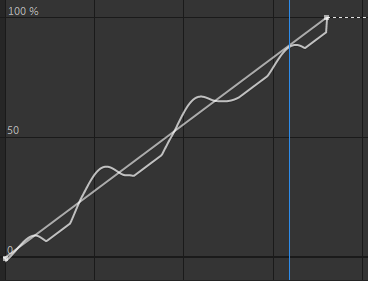
December 15, 2021 at 9:23 amAlso, the expression gives me some jolting. Screenshot attached, not sure if it works, never added a photo on here before.
Would be nice to smooth() POST expression value. I stumbled across an old post from about 10 years ago that you had commented on (I’m pretty sure every thread I look at, you’ve helped someone, so thanks for being awesome).
You mentioned “building your own smoother” like this:(valueAtTime(time – .1) – [10,10,10] + valueAtTime(time – .05) – [10,10,10] + value – [10,10,10] + valueAtTime(time + .05) – [10,10,10] + valueAtTime(time + .1) – [10,10,10])/5;
Is there a way I could implement this into my current expression?

Reply to this Discussion! Login or Sign Up