Creative Communities of the World Forums

The peer to peer support community for media production professionals.

Activity Forums Adobe After Effects Problem with PATH and SHAPES.

  • Michael Szalapski

    November 9, 2021 at 1:47 am

    There are a number of ways to do this. One would be to use the paths to nulls script panel to place these objects along the path.

  • Marcin Wiktorowski

    November 9, 2021 at 1:51 am

    Please, explain and show me how

  • Michael Szalapski

    November 9, 2021 at 2:11 am

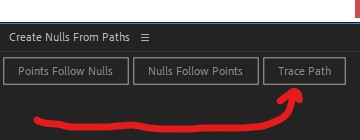
    Open up the Create Nulls From Paths script (in the Window menu).

    Select the path you’d like the shapes to follow.

    Press the Trace Path button.

    It’ll give you a null with a control to put it wherever you’d like along that path (keyframed, so you’ll want to turn off the keyframes [press U to reveal all keyframed properties]).

    Parent a triangle to that null and you’re done!

    Repeat for as many triangles as you need.

  • Anders Hattne

    November 9, 2021 at 8:22 am

    “At worst” you could use the “omino snake” plugin. It’s free, but won’t be vector sharp, but it would be quick

  • Jake Brown

    November 9, 2021 at 9:16 am

    Hello there,

    In your case, a particle system would be helpful, but you might not have access to that.

    The way I would approach this would be by slowly building up layers of arrows via pre-comping. I’ve made an example AE project below for you:

    To create the spirals of arrows, I would just take the same approach again, but this time, instead of beginning from a straight line, I would start from a slightly curved line and then begin building up the layers.

    Using the turbulent displace effect in moderation can be powerful, too.

    Good luck!

  • Marcin Wiktorowski

    November 11, 2021 at 12:14 am

    I considered that too, but I have already found another way

  • Marcin Wiktorowski

    November 11, 2021 at 12:16 am

    It was not what I mean. But thanks anyway.

  • Marcin Wiktorowski

    November 11, 2021 at 12:25 am

    Thanks!

    I’ve used your idea, but you’ve put me on the right path!

    I walked around and could’n see solution. Your one word halped me find it!

    Thanks!!!!

We use anonymous cookies to give you the best experience we can.
Our Privacy policy | GDPR Policy