Creative Communities of the World Forums

The peer to peer support community for media production professionals.

Activity Forums Adobe After Effects Help needed to fix gesticulating motionlapse!

  • Help needed to fix gesticulating motionlapse!

    Posted by Jacob Giacometti on November 5, 2021 at 8:20 am

    Bonjour 🙂

    [Clip I’m talking about posted at the end of this paragraph]

    This timelapse was shot using the motionlapse feature of the Ronin-S gimbal. Therefore, the motorized head doesn’t have the precision of a dedicated motionlapse gear, and also tends to be a bit loose against the wind.

    I have been trying to find a way to make the shot as smooth and clean as possible in post.

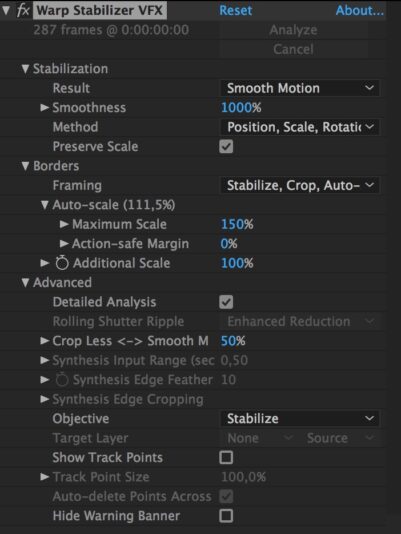
    Warp stabiliser helps a lot (1000%, detailed analysis, position/scale/rotation mode), but probably can’t fix everything, especially the slight rotations and lens distortions.

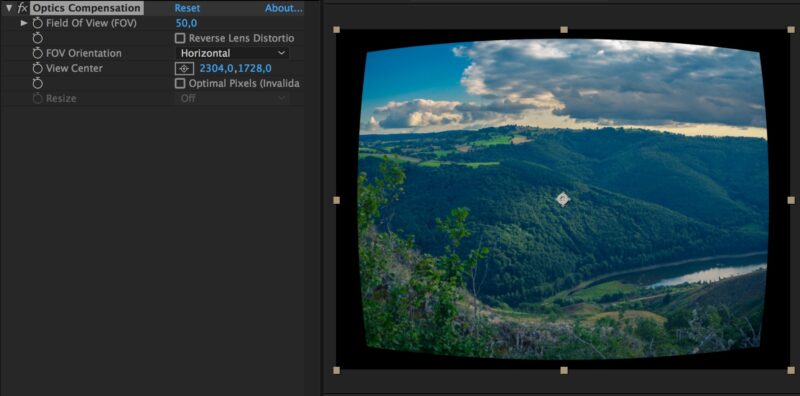
    I then tried adding the Optics compensation filter (50%) to make up for the lens distortion, but I don’t see any great difference (maybe I did the settings wrong) ?

    The lens used is a 14mm on M4/3.

    Any techniques or suggestions to butter up the shot would be greatly appreciated, as I have a bunch of other really nice but buggy timelapses like this !

    VIDEO LINK on Youtube : https://youtu.be/dp5I1gArqMg

    Thank you very much 🙏🏻

    Jens Noelte replied 4 years, 6 months ago 2 Members · 2 Replies
  • 2 Replies
  • Jacob Giacometti

    November 5, 2021 at 8:27 am

    I have no idea why posting a simple .jpg screenshot seems to be such a challenge ! 😆

  • Jens Noelte

    November 6, 2021 at 7:05 am

    Hey Jacob,

    I guess moving objects in your shot are throwing off the stabilizer. Precompose your shot. In the precomp, add a color matte ctrl+Y above your footage and disable its visibilty. Roughly mask out moving objects like foreground trees and sky/clouds, then feather the mask. Now turn on visibility. Go back to main comp and warp stabilize your precomp. After stabilizing, go into precomp and turn of the visibility of the color matte, then render.

    This works in most cases if theres enough to source footage visible to track. With the sky masked, there may not be enough image to track, in that case leave stabilize mode set to “position, scale, rotation”, “warp” probably wont work.

We use anonymous cookies to give you the best experience we can.
Our Privacy policy | GDPR Policy