Creative Communities of the World Forums

The peer to peer support community for media production professionals.

Activity Forums VEGAS Pro Unmasking Masking

  • Unmasking Masking

    Posted by John Perez on September 11, 2021 at 7:26 am

    I want to have more than one mask inside the same event (clip). I can do the first one fine but when I attempt to create the second mask all it reads is black inside the cut out. I want to see the track below it. Why can’t I do this? What am I doing wrong? Thx…

    John Perez replied 4 years, 8 months ago 2 Members · 16 Replies
  • 16 Replies
  • Graham Bernard

    September 11, 2021 at 8:02 am

    What VP and Build?

  • Graham Bernard

    September 11, 2021 at 8:07 am

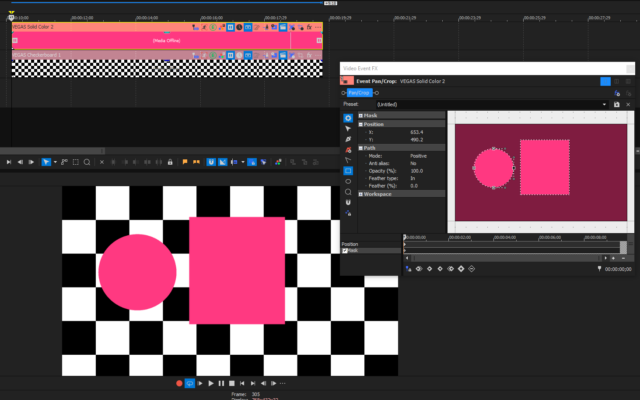
    Do you mean this?

  • Graham Bernard

    September 11, 2021 at 8:11 am

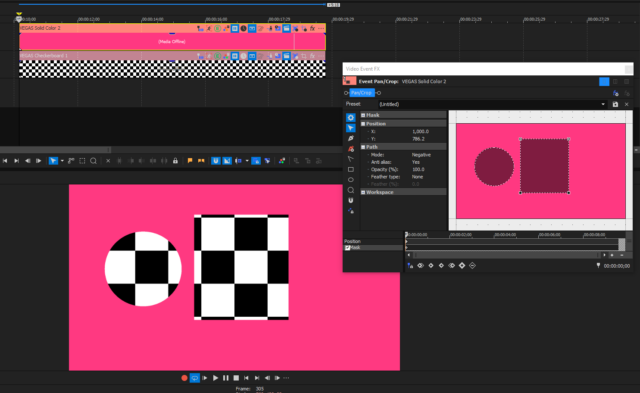
    Or this?

  • John Perez

    September 11, 2021 at 8:31 am

    Yes, the second one…(Sorry for duplicate posting.)

  • John Perez

    September 11, 2021 at 8:33 am

    VP 18 Build 527

  • Graham Bernard

    September 11, 2021 at 8:36 am

    Interesting. OK, so, before I install VP18, and see if it is a Bugster, could you clearly show your controls on the sample of the issue you’re getting?

  • John Perez

    September 11, 2021 at 8:42 am

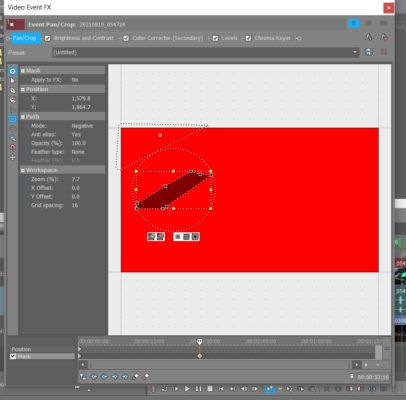
    This?

  • Graham Bernard

    September 11, 2021 at 8:45 am

    And the Triangle?

  • John Perez

    September 11, 2021 at 8:48 am

    That’s the second cut out that just shows up black.

  • Graham Bernard

    September 11, 2021 at 8:50 am

    Ahah! OK, please select the Triangle and let us see the controls – please? BTW, this looks like a super-complex bit of compositing – yes?
Page 1 of 2

We use anonymous cookies to give you the best experience we can.
Our Privacy policy | GDPR Policy