Creative Communities of the World Forums

The peer to peer support community for media production professionals.

Activity Forums Maxon Cinema 4D Randomizing Child Objects of Nested Cloner

  • Randomizing Child Objects of Nested Cloner

    Posted by Kevin Whitt on July 5, 2021 at 12:31 pm

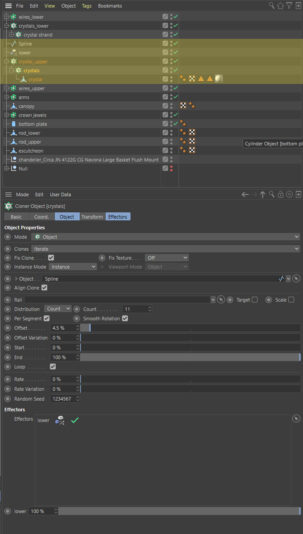
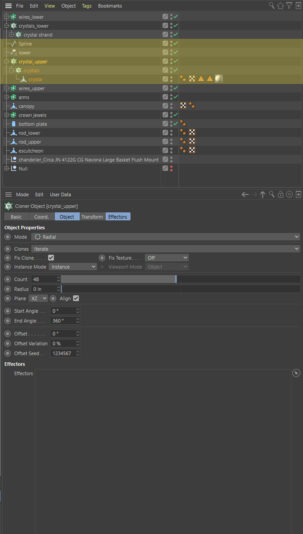
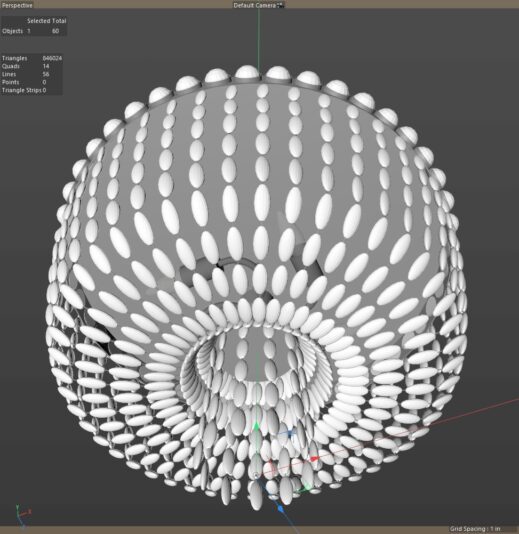
    I’m creating a chandelier with multiple crystals. The child cloner is in Object Mode where I have instances of a crystal object positioned along a spline. This cloner is a child of a cloner in Radial Mode where I rotate 47 copies. I’d like to add some randomized rotation to the individual crystals. When I add a random effector to the child cloner it will only randomly effect the rotation of each individual “strand” of crystals. This same random rotation is repeated in each subsequent copy of the parent cloner in Radial Mode. How would I go about randomizing each individual crystal with a similar setup? As you can tell I do not use Mograph very often. Thanks, Kevin

    Jim Scott replied 5 years, 1 month ago 2 Members · 10 Replies
  • 10 Replies
  • Jim Scott

    July 5, 2021 at 4:53 pm

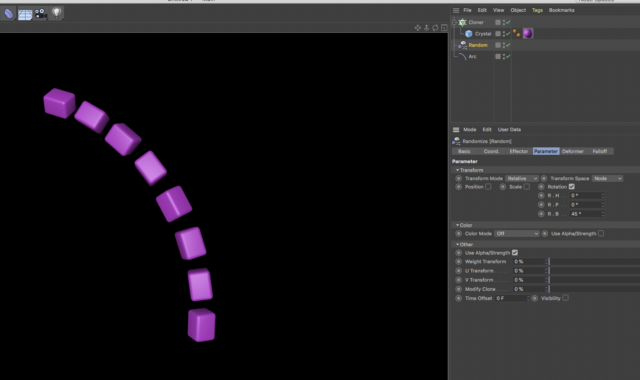
    See if the setup for a strand of crystals pictured below helps. If not, please upload your project file.

  • Kevin Whitt

    July 5, 2021 at 7:46 pm

    Jim – thanks for the response. I think you are showing random rotation of a single strand. I am hoping to rotate all of them after using a second cloner object in the radial mode. I am able to do what you’ve shown, but can’t create the randomness I need in the second cloner.

  • Kevin Whitt

    July 5, 2021 at 7:48 pm
  • Jim Scott

    July 5, 2021 at 8:33 pm

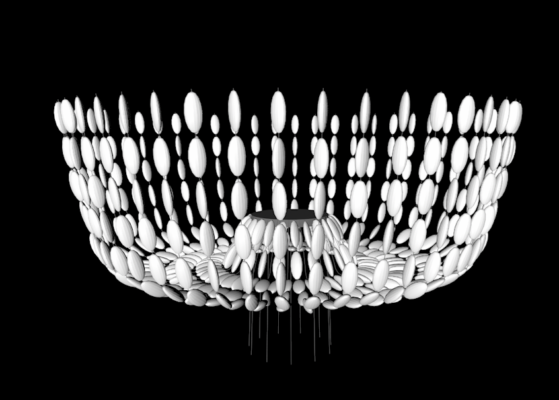
    It seems that you have changed your setup since uploading the original images. You had cloners before, whereas the project now is using Fracture objects to apply the random effectors. And from what I see, you are getting random rotation of the crystals on each strand. I removed the transparent materials and increased the random rotation value for clarity, then soloed the upper crystals in the render below. I guess I am confused about what you’re after if the result pictured doesn’t show it.

  • Kevin Whitt

    July 5, 2021 at 8:42 pm

    You’re right. Sorry I uploaded the wrong file. The previous one was the solution I came up with. I’d still like to know if it’s possible to do this with the original setup – now attached. Thanks, Kevin

  • Jim Scott

    July 5, 2021 at 9:21 pm

    Ok, I understand now. I guess I didn’t take my example far enough to see the issue with the radial cloner. I would think that random rotation of each strand in the cloner would be possible, but I’ll need to think about it some more. It might need to use some xpresso, which I am not very familiar with. Perhaps someone else will chime in in the meantime, but I will continue to dig further.

  • Kevin Whitt

    July 5, 2021 at 9:33 pm

    I’ve got a solution, but mostly curious if there’s a way to manipulate the child cloner without having to resort to making it editable. Thanks again for the help and interest. Kevin

  • Jim Scott

    July 5, 2021 at 9:46 pm

    I’m curious, what did you do to the original setup with cloners to get to the first one you uploaded with the fracture objects?

  • Kevin Whitt

    July 6, 2021 at 9:31 am

    Jim – I simply got the crystals in their initial position and then made them editable. After that they were all placed in a fracture object where I could randomize the rotation.

  • Jim Scott

    July 6, 2021 at 2:31 pm

    Thanks Kevin. That’s what I thought but hadn’t played around with it yet. I still haven’t come up with a way to do it with the original cloners, but I’ll let you know if I do.

We use anonymous cookies to give you the best experience we can.
Our Privacy policy | GDPR Policy