Creative Communities of the World Forums

The peer to peer support community for media production professionals.

Activity Forums Adobe After Effects Expressions Another sourceRectAtTime problem??

  • Another sourceRectAtTime problem??

    Posted by Nick Kennedy on February 25, 2021 at 9:46 am

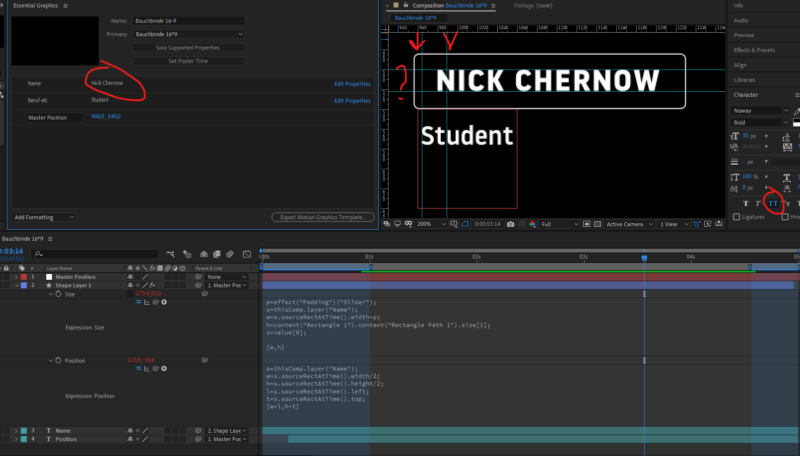
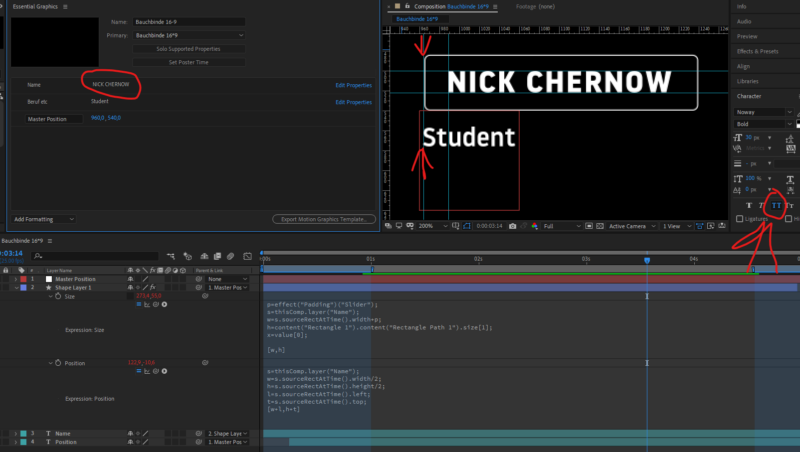
    Hi everyone, I got a problem again. My sourceRectAtTime expressions were all looking really good thanks to all the help at creative Cow! Now a producer wants all the Names to be in All Caps. So tom make sure nobody messes this up I’m using the all Caps button in the Charachter Panel. This works fine and if anyone should accidently type in small Caps in the MOGRT it gets converted to All Caps. Great . . . but . . . The Name and the Shape Layer(Text Box) are now slipping almost 10 Pixels to the left. Can anyone help me with what is going on here? The Anchor Point of the Text appears to change when Small Caps are used. Why should that be? Is there anyway or any expression to kind of cement the anchor point regardless of Small Caps or All Caps? Any help would be greatly appreciated!

    Trent Armstrong replied 5 years, 2 months ago 3 Members · 2 Replies
  • 2 Replies
  • Robert Müller

    February 25, 2021 at 11:32 am

    Hi, I cant reproduce your errors using what I see in the screenshots. How is your text alligned? I only get something close to this using center allignment in the paragraph window

  • Trent Armstrong

    February 25, 2021 at 2:25 pm

    Nick,

    I can’t recreate it either. Here are a couple of suggestions:

    1) Make sure your Scale for each layer is set to 100%. Otherwise, you might need to do some math in your expression to adjust for that.

    2) Since you have some parenting going on, there might be a slight issue with the sourceRectAtTime() calculation. You could always set the position inputs to 0, 0 and then use a line like:

    [newX, newY] + value //Use the position x and y to make adjustments after the fact

    3) Instead of AllCaps in the Character panel you could try:

    style.setAllCaps(true)

    or

    txt = text.sourceText;

    txt.toUpperCase()

    Recently, my two issues were the parenting and the scale. I hope you get it solved quickly!

    Trent

We use anonymous cookies to give you the best experience we can.
Our Privacy policy | GDPR Policy