Creative Communities of the World Forums

The peer to peer support community for media production professionals.

Activity Forums Adobe After Effects Expressions loopOut(“continue”) not interpreting correctly 2d values

  • loopOut(“continue”) not interpreting correctly 2d values

    Posted by Mateo Mazzini on February 2, 2021 at 8:11 pm

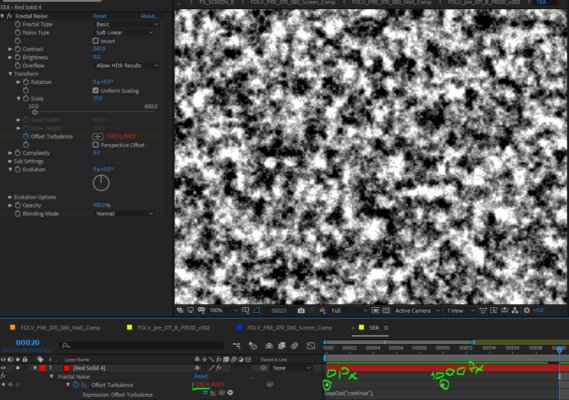
    Hi, I use the loopOut(“continue”) to quickly animate a forever-going element with just two keyframes, usually, it works really well, but sometimes I see it won’t work, here’s an example. I put a Fractal noise in one layer, I animate the offset with two keyframes, it moves 1000px in X in 10 frames, then I write loopOut(“continue”) in the offset expression, and I would expect that on frame 20, the offset would’ve moved another 1000 px. but it is not, it only moves 282.4 px more. I guess this happens because I’m applying “continue” to a 2-dimensional value, but it works in position even if I don’t separate dimension. Do you have any solutions that involves using the expression?

    I’ll post an image of what I’m doing In AE

    thanks

    Mateo Mazzini replied 5 years, 3 months ago 5 Members · 7 Replies
  • 7 Replies
  • Dan Lind

    February 2, 2021 at 9:07 pm

    Hi Mateo,

    Since you’re used to the expression I guess you’ve checked this already, but just in case – Are both key frames linear? If they’re not, the result your getting is typical.

    Hope you find a solution!

    / Dan

  • Dan Lind

    February 2, 2021 at 9:14 pm

    Sorry, just looked closer on your screenshot and it looks like the keyframes are linear, but just in case, look a the graph to make sure.

    Otherwise I would animate a null with the expression and connect the offset to it. Not a pretty solution, but if it’s a bug there’s no reason to waste more time.

  • Trent Armstrong

    February 2, 2021 at 9:19 pm

    I am curious if separating the x and y would solve the issue.

  • Mateo Mazzini

    February 2, 2021 at 9:41 pm

    the null option would work that’s true. I know it because when using the expression with position properties works well, and just to be sure you can separate dimensions to make it work perfectly. However, I am intrigued if there’s a way to say loopOut to only one dimension inside the expression or if there’s a tweak to make the expression work directly in the property.

  • Robert Müller

    February 4, 2021 at 10:01 am

    You should check the spatial interpolation of your keyframe, it might be on Auto Bezier and you should set it to linear.

    Another tip: you can always use “time” as a constantly growing variable to achieve something similar

  • Filip Vandueren

    February 4, 2021 at 10:22 am

    I can’t replicate the error.

    Check in the Graph Editor, and enable the “Show post expression Graph” button on the property and you should see a nice continous line, if not, you should be able to trouble shoot it better by looking at what it is doing in the graph.

  • Mateo Mazzini

    February 4, 2021 at 1:33 pm

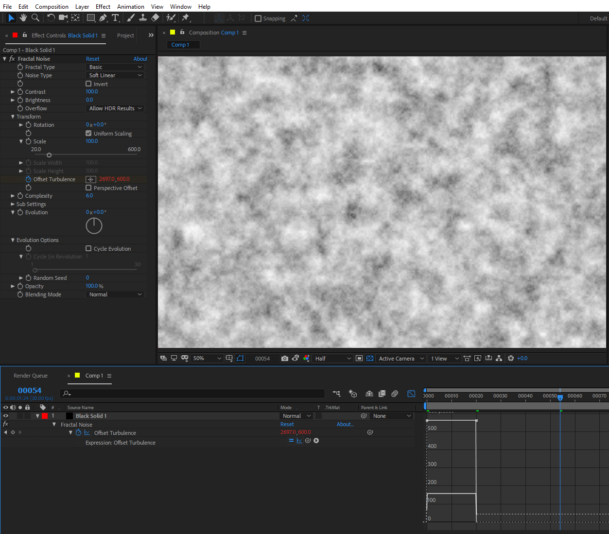
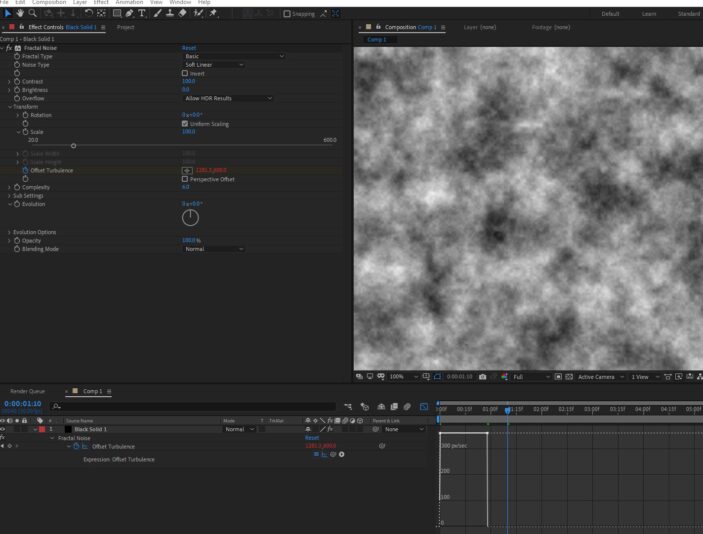
    I checked the spatial interpolation and when set to linear it wouldn’t work either. I was intrigued by your message saying that you cannot replicate the error, so I went to a different version of AE and it worked. At the office where I’m working, we have to use AE 2018 still for some projects and the error is showing up in that version, the current version of AE work as expected, I’ll upload two images, the first one is the graph editor of AE 2018, the second one is AE 2020 (17.6)

We use anonymous cookies to give you the best experience we can.
Our Privacy policy | GDPR Policy