Creative Communities of the World Forums

The peer to peer support community for media production professionals.

Activity Forums Adobe After Effects Overlapping shapes

Tagged: 

  • Vijay Narayanan

    December 27, 2020 at 10:37 am

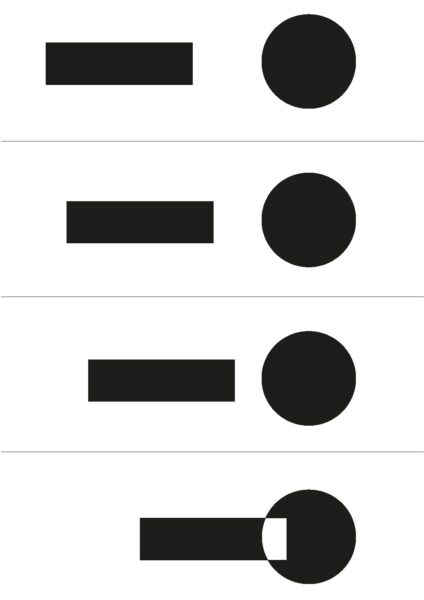
    Hello, I’d really appreciate if someone can point me to some youtube tutorials. None of the ones i found worked with the black colour shapes.

  • Graham Quince

    December 27, 2020 at 11:30 am

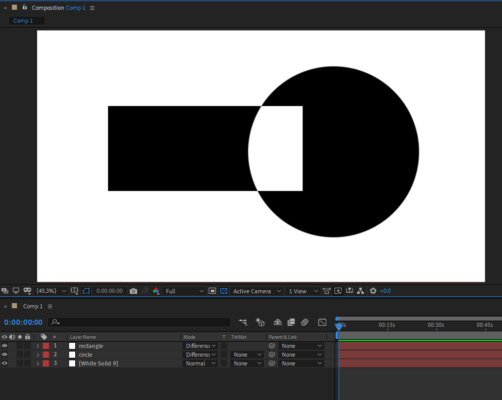
    That looks like it is using the difference layer transfer mode.

    Make sure both shapes are on different layers and they both need to be white. Then set a background layer to white as well.

    Once you’re all set up, use each layer’s transfer mode set to Difference.

    This tutorial I made for CreativeCow might help a little too, although I don’t talk about the Difference mode: https://www.youtube.com/watch?v=xqKyyi7nXBw

    Some contents or functionalities here are not available due to your cookie preferences!

    This happens because the functionality/content marked as “Google Youtube” uses cookies that you choosed to keep disabled. In order to view this content or use this functionality, please enable cookies: click here to open your cookie preferences.

  • Vijay Narayanan

    December 28, 2020 at 9:09 am

    Hi Graham,

    Thanks a lot for the response. I was struggling with masks and multiple precomposed layers to achieve this, you made my job a lot easier. I have attached my animation.

    Cheers,

    Vijay.

We use anonymous cookies to give you the best experience we can.
Our Privacy policy | GDPR Policy