

-
Ideal settings to render SD transfers to MP4
I’m transferring a few different SD formats to digital, MiniDV, 8mm tape, VHS, and VHS-C- The VHS stuff I’m “dumping” into Type 2 DV-AVI files with WinDV. Same method I’m using for the 8mm and MiniDV. Currently using Vegas 17.0.0.284 to edit and render. I know, you’ll ask why capture with a different app. It’s habit from many years back and WinDV is free, so I’m not out anything.
I’ve rendered some stuff to MP4 basically matching the settings of the source material. Source is of course 720x480i and I’ve always chosen Lower Field First for Field Order, as that’s how I understood NTST SD video to normally be from ages ago? So until now when I render I have used either Sony or Magix AVC and rendered 720×480 at 8-10Mbps, Lower Field First. Un-check “Allow source to adjust frame size & rate”, Lower Field First, 29.97fps.
The renders look great. I’m worried about “universal” playback is how I’ll word it. I’ve been telling anyone I give them to if you view it on a PC to download VLC Media Player since it can handle the de-interlacing and change the AR if needed. Viewing on a TV or disc player it will handle that of course.
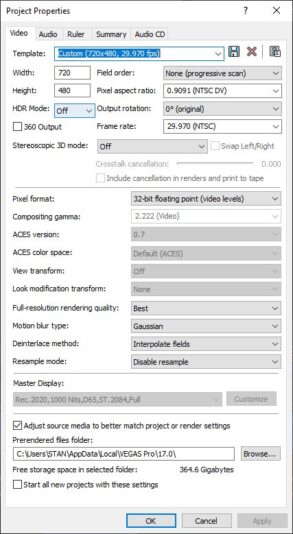
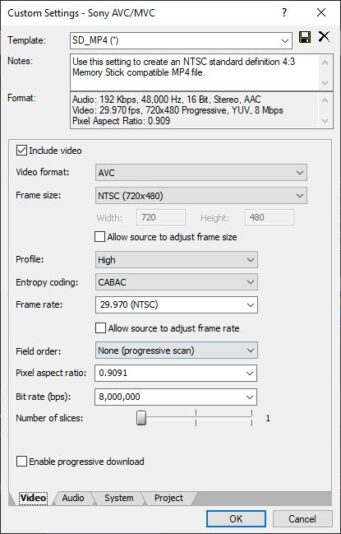
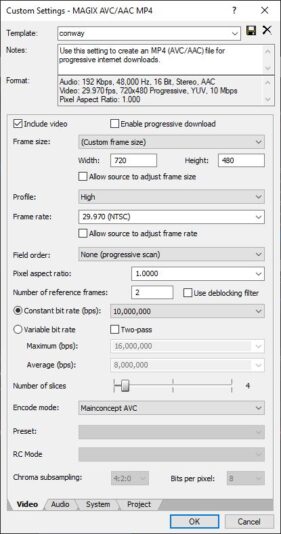
So if I want to render everything to progressive as the end result so I can just give them the footage and be done I want to make sure I’m using the right settings. I’ll attach screenshots of project settings and render settings with both codecs. The tests I’ve rendered seem to be good. I have watched them on a 50″ TV and they look good. I just want to make anything I give out easy for them to be able to view with whatever software or hardware they choose.

Sorry, there were no replies found.