Creative Communities of the World Forums

The peer to peer support community for media production professionals.

Activity › Forums › Adobe After Effects › Anyway to render at 90FPS (MP4) in after effects?

  • Anyway to render at 90FPS (MP4) in after effects?

    Posted by Ryan Khan on December 14, 2020 at 11:20 pm

    I really need this composition to be rendered at 90FPS, problem is whenever I set the output format to H264, it renders at 60FPS instead of 90. I have a video clip which is MP4 @90 FPS, so I know it is possible but why cant I do it in After effects ? Please help

    Eric Santiago replied 5 years, 9 months ago 2 Members · 3 Replies
  • 3 Replies
  • Eric Santiago

    December 15, 2020 at 3:20 am

    The clip is 90fps?

    Export to QT at that framerate then use AME and use h264.

    Check for Match Source option to maintain that framerate.

    Why 90?

  • Ryan Khan

    December 15, 2020 at 4:54 pm

    Thanks for your reply

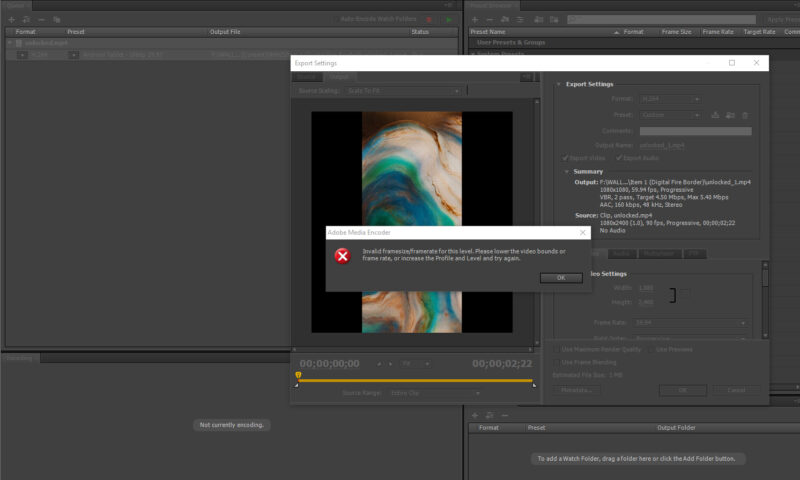
    The composition is set to 1080×2400 @ 90FPS, its a particle animation.
    I exported to QuickTime, same frame rate ?

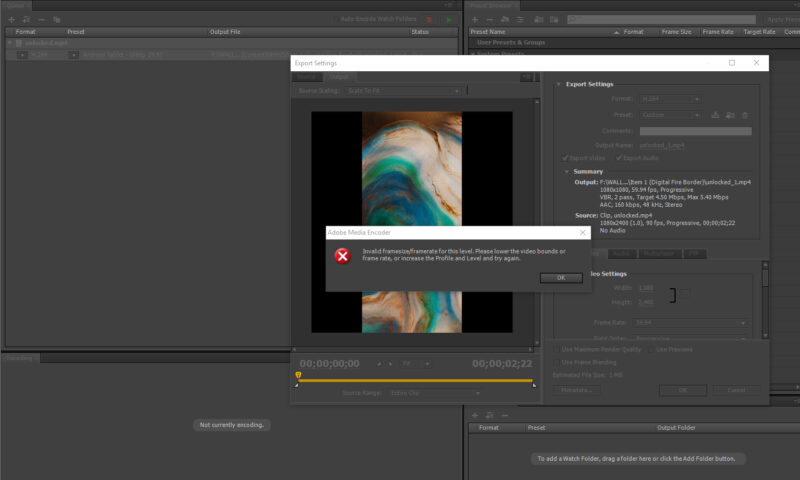
    Then launched AME, now when I select H264 I get this message. I tried playing with baseline settings, no luck.

    Im trying to make this live wallpaper for phone with 90FPS

  • Eric Santiago

    December 18, 2020 at 3:55 am

    Is it required to be set at 90fps?

    Seems odd.

We use anonymous cookies to give you the best experience we can.
Our Privacy policy | GDPR Policy