-
Text Corner (worked in CC2015 and have issue in CC2019)
Hello everyone
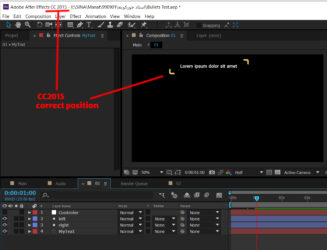
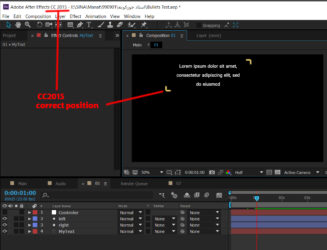
in this projects i have to read a text from specific marker comment and create a dialogue box like what u see in attached images
because there is more than 100 markers i tried to automate it by expressions
so i wrote this code for reading marker comments easily and it works fine:
n=thisComp.layer("Controler").effect("Caption Number")("Slider");
comp("Audio").layer(1).marker.key(n).comment;
and also these codes for placing shapes in correct position
for bottom left:
gap =thisComp.layer("Controler").effect("Gap")("Slider") ;
L = thisComp.layer("MyText");
r = L.sourceRectAtTime(0,true);
y = L.position[1] + (r.top + r.height - L.anchorPoint[1])*L.scale[1]/100 + scale[1]*height/200 + gap;
x = L.position[0] + (r.left - L.anchorPoint[0])*L.scale[0]/100 - scale[0]*width/200 - gap;
[x,y]
and this for top right :
gap = thisComp.layer("Controler").effect("Gap")("Slider");
L = thisComp.layer("MyText");
r = L.sourceRectAtTime(0,true);
x = L.position[0] + (r.left + r.width - L.anchorPoint[0])*L.scale[0]/100 + scale[0]*width/200 + gap;
y = L.position[1] + (r.top - L.anchorPoint[1])*L.scale[1]/100 - scale[1]*height/200 - gap;
[x, y]
as u can see in attached images these expressions worked very well in AE CC2015
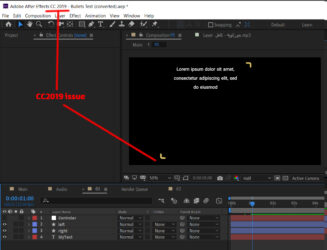
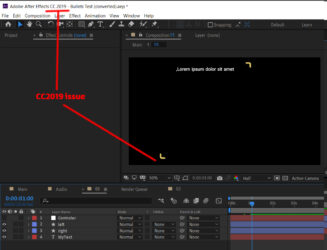
but in CC2019 there is an issue u can see in images
please help me
thanks