

-
Matching 3D camera with 360 video image within 3D Studio Max
Hi there,
I have a bit of a specific problem here.
The company I work for normally creates 360 images, matching photo’s and 3D to show how areas can change when infrastructures change, or when (new parts) of residential area’s are build. We do a lot of work for solar fields, to show the impact for local residents.
Normally we do this with static 360 photo’s, and we have a pretty slolid workflow doing this. But recently we got a project doing what we normally do, but with 360 video. And we run into some problems.
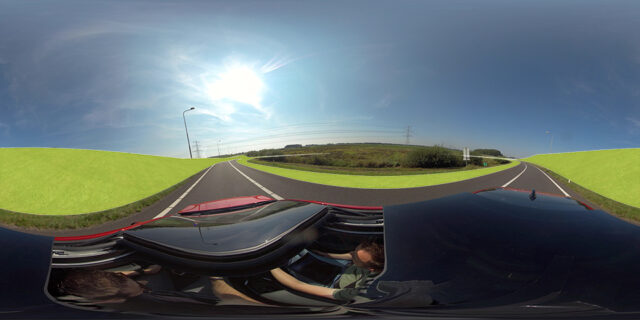
So we have a bunch of 360 video images. These images are shot from a driving car on a highway with a 360 videocamera (Insta360 Pro 2). I have tracked these images using PFTrack to recreate the camera and camerapath in 3D. Those may not be perfect, but are good enough to work with.
For two of the tracks (there are eight in total), there was nog problem matching the 3D camera and video footage in 3DS Max. The problems began when I was working on the third video, where a lot of banking happends because the car makes a bend, and so the car (and thus the camera) drives over a slight slope. Because of this, the camera horizon isn’t straight, and I have a lot of trouble matching the 3D images and video footage together.
So what I have done (and tried):
– Tracking the video’s using PFTrack– Imported the tracked data in 3DSMax
– Placed the animated camera’s on the same location as where they should be in the real world using CAD data
– Convert the tracked camera path to a spline and use that to animate physical camera using path constraint.
– Put the video footage as an animated backgroud as reference.
– Adjusted the path and camera orientation where needed using the video background.
The above workflow went well for the first two tracks, as said earlier, but didn’t work out for the tracks with a lot of banking. I am able to adjust the camera accoarding to what I see in the viewport, but after rendering the image everything is completely off. I presume it has everything to do with my orientation, but I don’t know exactly how it goed wrong, since everything looks fine in the viewport.
In the end, the 360 video and the rendered 3D images would be brought together in AE.
Does any of you have any experience with this, and / or have any ideas and tips what I can try to make this work?
I posted en example image to show what goes wrong. Don’t mind the render quality and colors.

Sorry, there were no replies found.