Creative Communities of the World Forums

The peer to peer support community for media production professionals.

Activity Forums Adobe After Effects Expressions Scale expression

  • Stephen Dixon

    November 8, 2020 at 1:05 pm

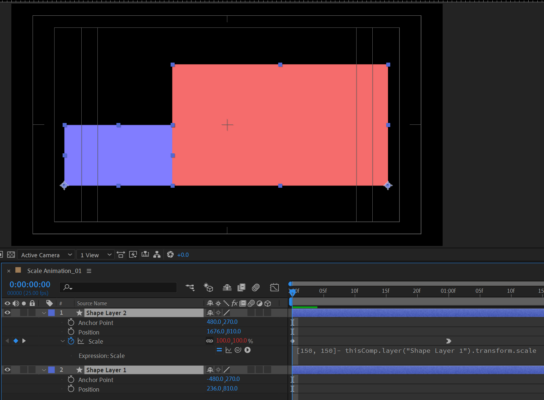
    When solid 1 is 100% scale, solid 2 is 50% and vice versa. So we can set the scale of the second solid thus:

    [150, 150]- thisComp.layer(“Shape Layer 1”).transform.scale

    To make its left edge line up with the right edge of solid 1, we can just put the anchor points of the solids at the bottom left and bottom right respectively. The easiest way to set this is to use the pan behind tool. Hit y and drag the anchor point to the lower left of the blue solid, holding ctrl to snap it to the corner point. Do the same for the red solid, but drag it to the lower right corner, holding ctrl to snap.

    Delete all the position keyframes, and apply the expression above to the scale property of solid 2.

    The values of anchor points of solid 1 in the file you shared were [0,540] and for solid 2 [960,540]. Then the position of solid 1 was [236,810] and solid 2 [1676,810].

We use anonymous cookies to give you the best experience we can.
Our Privacy policy | GDPR Policy