Creative Communities of the World Forums

The peer to peer support community for media production professionals.

Activity Forums Adobe Premiere Pro Preview Area

  • Preview Area

    Posted by Reine Touma on November 2, 2020 at 10:50 pm

    Hello,

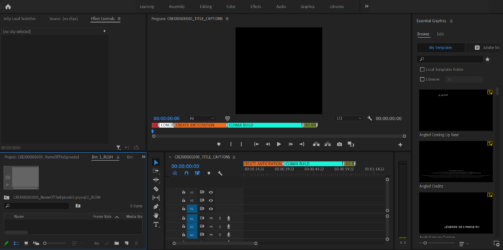
    I’m looking for a way to disable the preview area forever from my workspace.

    I know we can disable it by clicking on the 3 lines, but every time I open a project (or create one), this preview area reappears.

    Also, I have to switch to icon view EVERY TIME I open a project. I tried creating or modifying my workspace but the issue persists.

    If anyone has any idea how to set my current bin preference to default so I don’t have to redo this every time, it would be great. Since I have to work on many projects a day, it’s getting very frustrating.

    Thank you!
    Todd Perchert replied 5 years, 10 months ago 2 Members · 1 Reply
  • 1 Reply
  • Todd Perchert

    November 3, 2020 at 6:48 pm

    Do you have a typical sequence setting you use for most of your projects? What I do, since my biggest export is for broadcast, is I have set up a template folder. Inside that folder I have folders for audio, video, graphics, animation or AE, and an export folder. All my associated files go into those folder, possibly in other folders. And a template PPro project with the settings I like and bins set up to mirror my folders. Then I just duplicate my project folder, rename it to whatever project I’m working on, and rename the PPro project file inside – that’s what I work from. That way everything stays the way I like it when I open that project and everything self-contained and organized. 🙂

    That’s how I handle that. So I don’t have to select all kinds of settings whenever I make a new project.

    TC

We use anonymous cookies to give you the best experience we can.
Our Privacy policy | GDPR Policy