Creative Communities of the World Forums

The peer to peer support community for media production professionals.

Activity Forums Adobe After Effects Animated logo that moves in a circle?

  • Graham Quince

    October 25, 2020 at 2:29 pm

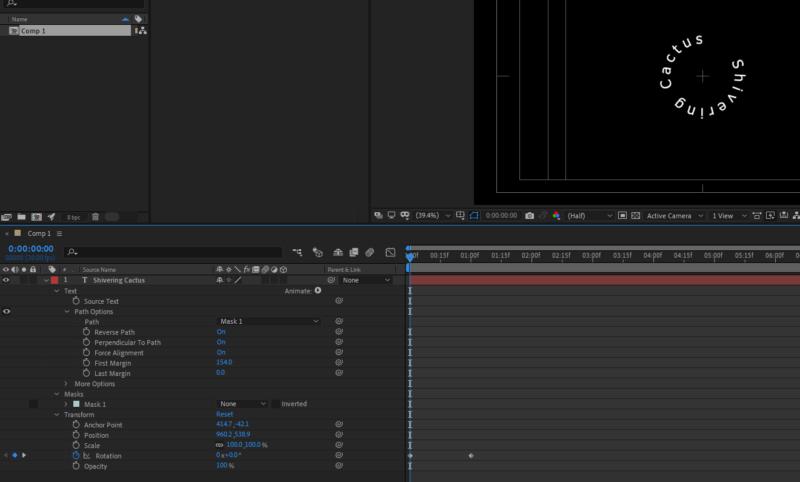
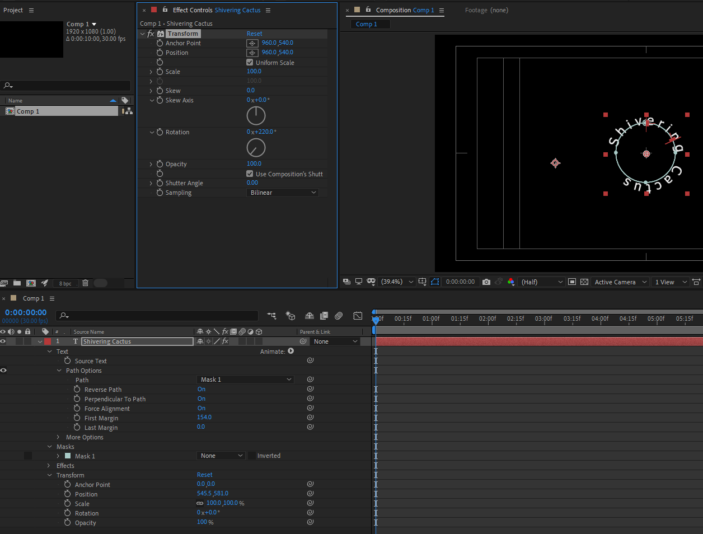
    For your text in a circle in After Effects, add your text layer, then draw a circular mask. Then in the text layer properties, in Path, choose your mask.

    And animate the rotation as normal. You might run into issues getting your mask and anchor point precisely lined up, so the circle doesn’t woggle, but if you use the Transform effect and the rotation controls in that, it’s much simpler.

    However, if you want to make this web friendly, then making if a GIF after creating the video is probably the way forward (I tend to use giphy.com rather than Photoshop for GIFs), but you might want to check out this codepen and animate in code instead: https://codepen.io/Lastly/pen/wvwGXme

  • Brendon Murphy

    October 27, 2020 at 8:19 pm

    For the web-friendly part, you may consider turning into a GIF. Export a 360 degree rotation (minus 1 frame). Then import as video layers into photoshop. Export > Save for Web (Legacy). Choose GIF.

We use anonymous cookies to give you the best experience we can.
Our Privacy policy | GDPR Policy