Creative Communities of the World Forums

The peer to peer support community for media production professionals.

Activity Forums Adobe After Effects Expressions Get value of an Anchor-Point of an Layer which name is choosen by CSV

  • Get value of an Anchor-Point of an Layer which name is choosen by CSV

    Posted by Jonas Schwarzer on October 22, 2020 at 9:10 am

    Hello, have an Problem with my code. I have csv table with two columns: One “MarkerNr” and one “Landkreis” (german word for counties). I have a Slider with the rounded values of 1-10 which use to select the row i want to access. In the column “Landkreis”, i have the name of the counties (for example “Ortenaukreis”) and i have many Layer with the counties name (so for example one of the Layer names is “Ortenaukreis”, too). Now i want the Position of an Null Object too get set to the Anchor-Point of the choosen Layer Name from the CSV. But it doesn’t work, it will show an error message tranlated from german says something like: Layer-Index 0 not within the allowed range…

    Here is my code:

    markerNr = thisComp.layer(“Werte_Speicher”).effect(“Auswahl-MarkerNr”)(1); //this is the slider to choose the row

    landkreis = footage(“Landkreisauswahl.csv”).dataValue([1,markerNr]); //get value from the csv at position of slider

    l = thisComp.layer(landkreis); // acces the Layer with name written in the csv (e.g. layer with name “Berlin” or “Ortenaukreis”)

    l.toComp(l.anchorPoint); // get position of the selected layers anchor Point in this comp

    my CSV looks like the one in the photo i attached. Hope i could explain may problem good enough (my english isn’t the best) and someone can help me with this.

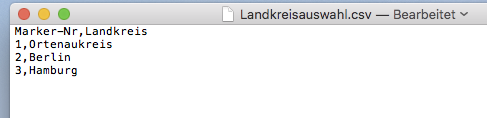
    Jonas Schwarzer replied 5 years, 6 months ago 2 Members · 4 Replies
  • 4 Replies
  • Jonas Schwarzer

    October 22, 2020 at 10:35 am

    i found a solution that (kind of) works BUT still shows an error (while working). I think the problem is with the String which i use to access the layer. So i tried to convert it to a String but maybe i did it wrong or it is not the problem. With adding four ‘ to the code, it seems to kind of work.

    The same when i enter the Layer-Name manually e.g.: l = thisComp.layer(“Berlin”);

    –> this works fine too.

    Here is the code that kind of works now:

    markerNr = thisComp.layer(“Werte_Speicher”).effect(“Auswahl-MarkerNr”)(1);
    landkreis = footage(“Landkreisauswahl.csv”).dataValue([1,markerNr]);
    l = thisComp.layer('' +landkreis +''); //<<--- here i added ''
    l.toComp(l.anchorPoint);

    But since it still shows an error i think there is something i am missing and i think it is they way it uses the String that i get from CSV… Hope someone can help me more

  • Stephen Dixon

    October 22, 2020 at 10:35 am

    Try making a text layer and setting the source text using the expression to test what value landkreis is returning. E.g., put this on the source text property:

    markerNr = thisComp.layer(“Werte_Speicher”).effect(“Auswahl-MarkerNr”)(1); 
    landkreis = footage(“Landkreisauswahl.csv”).dataValue([1,markerNr]);
    landkreis

    That will tell you if the data is coming from the csv properly

  • Jonas Schwarzer

    October 22, 2020 at 10:39 am

    Did this already and works fine. No problem there – this is what bugs me. I can use it to get the text as source text and it always shows the correct string but as a Layer-Name it has problems… I think this really comes from the fact that you use “” for getting the Layer-Name. In my before post you can see i found a work around, the expression still shows error codes BUT it is working – don’t ask me why. Still hoping to find a proper solution that works without error…

  • Jonas Schwarzer

    October 22, 2020 at 11:57 am

    Ok i found the solution… had to change variables value to a string:

    markerNr = thisComp.layer(“Werte_Speicher”).effect(“Auswahl-MarkerNr”)(1);
    landkreis = String(footage(“Landkreisauswahl.csv”).dataValue([1,markerNr]));
    l = thisComp.layer(landkreis);
    l.toComp(l.anchorPoint);

    this seems to work…

We use anonymous cookies to give you the best experience we can.
Our Privacy policy | GDPR Policy