Creative Communities of the World Forums

The peer to peer support community for media production professionals.

Activity Forums Avid Media Composer EDL Media Parsing/Cataloging Help

  • EDL Media Parsing/Cataloging Help

    Posted by John Turner on September 29, 2020 at 12:33 am

    Hi all,

    I’m working on a completely archival feature and we’re at the point of seeking clearance for all used media. The producer is asking me to parse out what audio and video is used in the piece and I’m really struggling to figure out an accurate way to use the EDL’s to parse out the accumulated media duration of each clip (separate video, audio, and media with audio and video linked) to pass on to our archivist.

    I’ve attempted to run the EDL through Brewer and organize everything in Excel, but the Accumulated Duration it produces seems to be combining the Audio and Visual duration into a single A/V reading, when I need clearly delineated Audio, Video, A/V events. A few people suggested I utilize Regex’s but after taking a crash course over the
    weekend, I’m not quite sure how they would help with this particular issue.

    Any advice or suggestions for the best workflow or resources would be a true blessing. I’ve been spinning my wheels all weekend trying to figure out a better system and I would be really grateful!

    Michael Phillips replied 5 years, 10 months ago 3 Members · 2 Replies
  • 2 Replies
  • Glenn Sakatch

    September 30, 2020 at 12:06 am

    I would be tempted to spend an hour or so and duplicate and breakup your timeline into layers.

    Video only clips on V1

    Audio only clips on A1

    Sync audio and video on V2/A2.

    don’t care about stereo or not for this…just a representation of each clips use.

    Then make separate edls for each type.

    Might not be the most elegant solution, but sometimes that turns out to be the easiest solution.

  • Michael Phillips

    September 30, 2020 at 5:52 pm

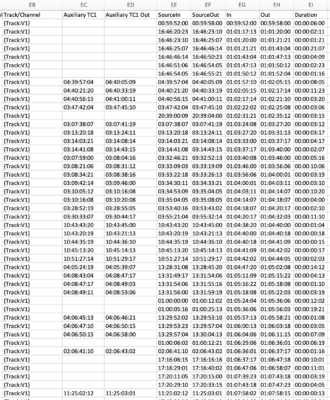
    I have a Cloud-based AAF to Excel ready file conversion that will break down the AAF by track and a duration calculated for each event along with all or any subset of source metadata you want to track. Here is a screenshot of just the timecode columns associated with each event on a per track basis but the spreadsheet includes all related source metadata on a per-event basis as swell.

    Michael

We use anonymous cookies to give you the best experience we can.
Our Privacy policy | GDPR Policy