

Activity › Forums › Apple OS X › QuickTime Pro Replacement
-
QuickTime Pro Replacement
Posted by Frederic Lumiere on September 17, 2020 at 2:57 pmThis is my first post in many many years. Seems like more than a decade 🙂 I miss Creative Cow!
So I held on to QuickTime Pro for as long as I could. Have it installed on many machines for quick splitting of clips keeping timecode intact, etc…
Finally, it looks like the new Mac OS 10.15.6 won’t support it anymore. I tried QuickTime X but it’s crap.
What do the pros use out there to replace QuickTime Pro? I have Avid Media Composer, FCP and Adobe Premiere Pro but I’m looking for a powerful utility app to manipulate QuickTimes on a Mac.
Thanks!
It’s good to be back Ron

(I just checked 2012 was my last post)
Terry Taylor replied 5 years, 8 months ago 6 Members · 20 Replies -
20 Replies
-

Jeremy Garchow
September 17, 2020 at 3:22 pmWelcome back! 2012, in the heat of the debate. Everything has changed since then, and also nothing has changed.
I’d have a look over at Video Tool Shed: https://www.videotoolshed.com
Or Digital Rebellion Pro Media Tools: https://www.digitalrebellion.com/promedia/
There’s also Telestream Switch: http://www.telestream.net/switch/overview.htm
They all have different capabilities with some overlap. It really depends on what you’d like to do.
-

Frederic Lumiere
September 17, 2020 at 3:28 pmThanks so much Jeremy! Trying Digital Rebellion now. All I need is the ability to quickly split clips with timecode.
-
Frederic Lumiere
September 17, 2020 at 3:32 pm -
Jeremy Garchow
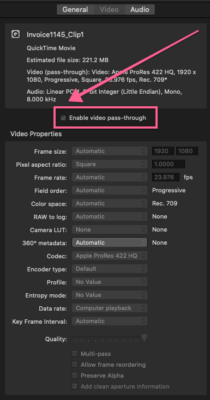
September 17, 2020 at 3:40 pmAnother thought is that you could use Compressor, set an in and out, and set both audio and video to passthrough to get new clips with TC.
-

Ron Lindeboom
September 17, 2020 at 11:10 pmIt’s good to be back, as well, Frederic. I was involuntarily absent myself for better part of a decade. So, like you, it’s good to be back.

I’m glad to see you popping in again. You are always welcome, Frederic, and it is an honor to have you here. I hope life has been treating you kindly, even in 2020.

The best to you always,
Ron Lindeboom
-
Frederic Lumiere
September 19, 2020 at 2:02 pmI would need the Switch Pro ($499) to do what I need. Which is simply slice out clips and keep the timecode track. Something QuickTime Pro could do easily. I’m really trying to not have to start a project with Media Composer, FCP X or Adobe Premiere Pro (We have them all) since we have to do this often to deliver broadcast clips for our hdarchives.com offering.
Do you know if it’s now possible to export clips without re-encoding with Adobe’s Media Encoder or Apple’s Compressor and keep timecode?
-
Jeremy Garchow
September 19, 2020 at 2:06 pmDo you know if it’s now possible to export clips without re-encoding with Adobe’s Media Encoder or Apple’s Compressor and keep timecode?
Yes. Load the clip in to Compressor. Select any preset (like a ProRes preset) and apply it to the movie. Mark an in and out, select the Video tab and select “Video Passthrough”, move to the audio tab, and choose “Audio Passthrough”, Name the output, and start the batch. This will very quickly create a new file that is bound to the ins and outs you set in the Compressor interface.
-
Frederic Lumiere
September 19, 2020 at 2:09 pmAh! Here’s the solution with Compressor. Check “Enable video pass-through”. I wonder if Adobe’s Media Encoder has a similar option.

Reply to this Discussion! Login or Sign Up