

Activity › Forums › Adobe After Effects › GEAR ANIMATION
Tagged: Basic
-
GEAR ANIMATION
Posted by Vahid Attaran on September 16, 2020 at 7:24 amHI GUYS!
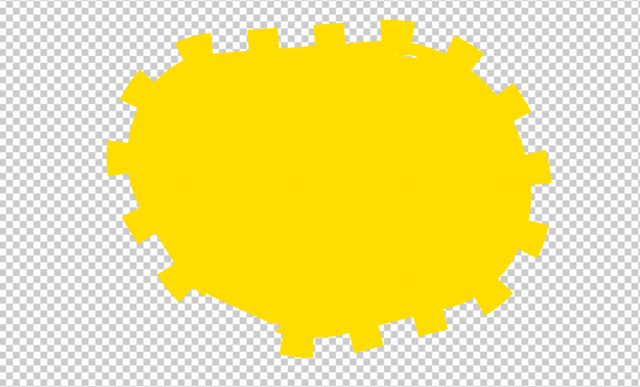
I am trying to animate the gear around this shape as a loop animation. So basically I want the gear to have repetitive movement around this shape. can someone help me ? thanks
 Filip Vandueren replied 6 years ago 4 Members · 5 Replies
 -
5 Replies
-

Vahid Attaran
September 16, 2020 at 7:45 am -

Michael Szalapski
September 17, 2020 at 2:05 amThe break in the bottom-left of that image…is that on purpose? If you want a gear to rotate around this, it’ll be a bit tricky to do, but it’s certainly possible. You can make your gear move around the shape with roving keyframes so the movement is even and then you can set rotation value with keyframes and dial it in to match the movement with just two keyframes (or a time expression). This is assuming that you have your teeth evenly spaced…which you don’t currently, but that’s fixable.
-

Filip Vandueren
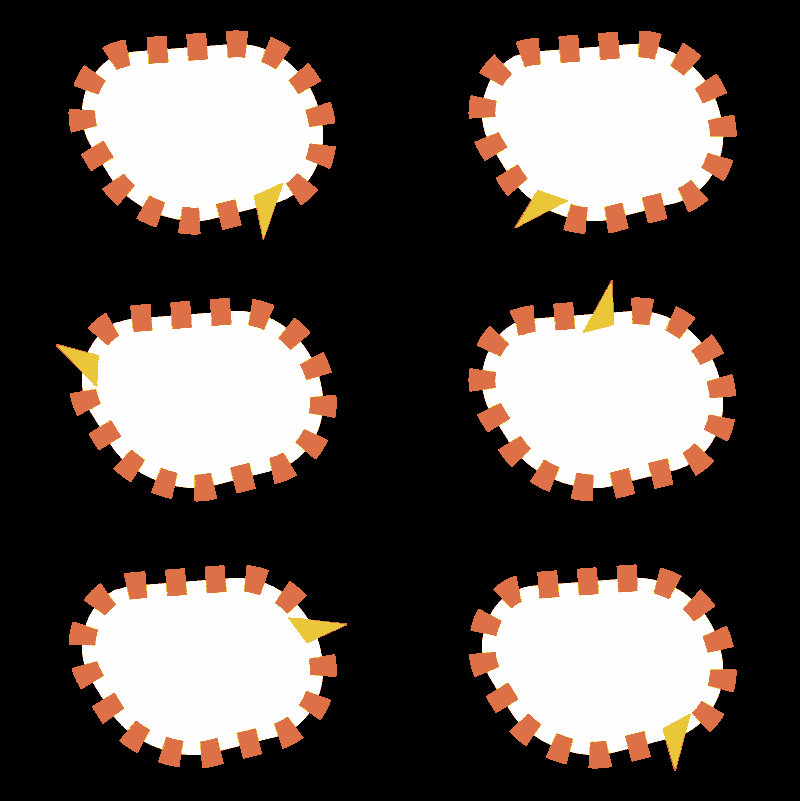
September 17, 2020 at 12:49 pmEasiest would be if you remove the teeth in illustrator and only keep the core shape.
– Then you create the straight teeth on a copy of the shape using a fat stroke with dashes.
– Add a “trim path” with its “end” around 92%, so 1 of them is missing. Animating the Trim Path offset will now rotate the cogs.
– select the Shape’s Path and run the “Create Nulls From Path” script with the option “Trace Path”
– parent your 1 irregular triangle tooth to this null, now line up the animation of the trace path with the Offset of the trim paths so the null is right in the center of where the 1 dash stroke is missing.

Reply to this Discussion! Login or Sign Up