Creative Communities of the World Forums

The peer to peer support community for media production professionals.

Activity Forums Adobe After Effects Expressions color change expression

  • color change expression

    Posted by Sean Kimber on August 30, 2013 at 9:44 pm

    Hi,

    I need to figure out a way to create an expression for a template. Here’s what I’m looking to do.

    I created an animation where I created some “concert lights” that had flares over them that changed colors. When I worked on it, I just manually changed the color on keyframes. However, I’m about to hand off the template to someone else, and I don’t want him to have to go in and manually change keyframes, since this is going to be a weekly project. I’d like to provide a master “color change” comp where he can pick a primary color and a secondary color and it will update the flares to alternate between the two colors. I know how to link colors in a comp to a master comp’s color picker. But I can’t figure out how to alternate between the primary and secondary color in the same layer (and then make it loop, so it goes back to the primary color, etc).

    Any help would be greatly appreciated.

    Thanks!
    Sean

    Dan Ebberts replied 2 years, 3 months ago 4 Members · 5 Replies
  • 5 Replies
  • Kevin Camp

    August 31, 2013 at 12:20 am

    you can’t have an expression overwrite keyframes with new values, but you could use the timings of those keyframes to drive the interpolation between two new color values…

    i’d create a null and add a color expression control effect to the null. rename the color control to ‘Color 1’ and then duplicate it (the duplicate will be named ‘Color 2’). then set those two color chips to be two different colors.

    then you should be able to add an expression like this to the color properties of the flares:

    c1 = thisComp.layer("Null 1").effect("Color 1")("Color");
    c2 = thisComp.layer("Null 1").effect("Color 2")("Color");

    n = 0;
    if (numKeys > 0){
    n = nearestKey(time).index;
    if (key(n).time > time) n--;
    }

    if (n%2==0){
    linear(time,key(Math.min(n,numKeys)).time,key(Math.min(n+1,numKeys)).time,c1,c2);
    }else{
    linear(time,key(Math.min(n,numKeys)).time,key(Math.min(n+1,numKeys)).time,c2,c1);
    }

    and the color property should take on the new colors in the color controls. if you needed the color controls in a different comp, create the controls in that comp and then direct the expression to use the color controls ins that comp.

    if you were using ease keyframes, change ‘linear’ in the expression to ‘ease’.

    Kevin Camp
    Senior Designer
    KCPQ, KMYQ & KRCW

  • Sean Kimber

    August 31, 2013 at 2:07 am

    Thanks! I’ll give it a shot!

  • Sean Kimber

    September 3, 2013 at 5:50 pm

    This worked perfectly! Thank you!

  • Alex Kogan

    April 9, 2024 at 11:09 am

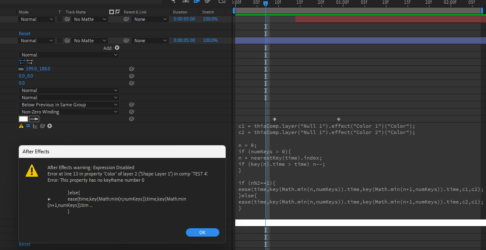
    The expression is great and works perfectly when the first keyframe is at 0 frame. When offsetting it gives an error which im having a hard time to understand. Does anoyone have an idea how to fix that?

  • Dan Ebberts

    April 9, 2024 at 3:31 pm

    Try it this way:

    c1 = thisComp.layer("Null 1").effect("Color 1")("Color");
    c2 = thisComp.layer("Null 1").effect("Color 2")("Color");
    n = 0;
    if (numKeys > 0){
    n = nearestKey(time).index;
    if (key(n).time > time) n--;
    }
    if (n == 0){
    c1;
    }else if (n == numKeys){
    c2;
    }else{
    if (n%2){
    linear(time,key(n).time,key(n+1).time,c1,c2);
    }else{
    linear(time,key(n).time,key(n+1).time,c2,c1);
    }
    }

We use anonymous cookies to give you the best experience we can.
Our Privacy policy | GDPR Policy