Creative Communities of the World Forums

The peer to peer support community for media production professionals.

Activity Forums Adobe After Effects Expressions continue motion velocity

  • continue motion velocity

    Posted by Jsbaxter on January 17, 2006 at 2:54 pm

    I would like to know how to continue velocity with a loop out expression. for example..I have a tracked subject that goes off frame..however the tracking markers go behind something durring the las 20 frames or so. The motion does a “U” shape..but at the end of the U is where it gets blocked..so is there a way for me to just allow after affects to figure out the motion and continue velocity? I tried “loopOut” with offset as the type..but it just continues the U shape over again, just offset from its final key frame..and obvious Pingpong wont work. Cycle will just repeat. and “Continue” doesnt seem to be a legit argument string..So can someone help me???

    Nate Vander plas replied 3 years, 3 months ago 8 Members · 9 Replies
  • 9 Replies
  • Mylenium

    January 17, 2006 at 6:42 pm

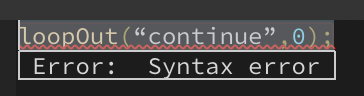
    loopOut(“continue”,0);

    Use it all the time, dunno why it doesn’t work for you.

    Mylenium

    [Pour Myl

  • Filip Vandueren

    January 17, 2006 at 6:57 pm

    So, you want After effects to guess where a layer would end up if it would just continue at the same speed and direction as was established by the last known keyframes ?

    The easiest way to do that is by hand:

    Just create a new keyframe (position presumably) or just drag the layer to where you think it should go: check the motion path to inform your guess.

    Now twirl open the speed option, and drag the keyframe in time untill the speed between the last keyframe and the one you created lines up.

    It’s not that hard to write an expression for this, but it seems a bit overkill, unless you want it to be mathematically correct.

  • Steve Roberts

    January 17, 2006 at 7:06 pm

    Me too. Check your syntax — expressions seem to be case sensitive.

    Steve

  • Filip Vandueren

    January 17, 2006 at 7:18 pm

    Ok, what the hell…

    here’s the expression:


    nk=numKeys;
    value;

    if ((nk>1) && (key(nk).time

    It works like a kind of "throw"

    If you keyframe two postions, rotations, opacities, scales etc... the property will just keep on going at constant speed.
    It does assume the interpolation is pretty linear.

  • Filip Vandueren

    January 17, 2006 at 10:55 pm

    Came back to it after some thinking:


    nk=numKeys;
    value;

    if ((nk>1) && (key(nk).time

    This sees what the property was doing in the last Frame before the last keyFrame, so it's a bit smarter when it comes to non-linear interplation.
    You could also set it to an even lower value like this: deltaT=0.001, in theory that would give you a more accurate value, untill the rounding errors kick in.

    Take note though that we're still talking about a linear motion after the last keyframe. If you want the expression to guess how a layer that moves in a curve would continue to curve...

    Well... do it by hand 😉

  • Kimberley Lund

    February 21, 2017 at 3:21 am

    Mine worked after I removed the “,0” from the expression:

    loopOut(“continue”);

  • Jan Vork

    June 24, 2021 at 9:23 am
  • Dan Ebberts

    June 24, 2021 at 6:13 pm

    Try changing the curly quotes to straight quotes:

    loopOut(“continue”,0)

  • Nate Vander plas

    January 6, 2023 at 2:51 pm

    This didn’t work for me either. I have two linear rotation keyframes on my 2D layer. I tried the loopOut(“continue”,0) expression, making sure they were straight quotes and not curly- gives me a syntax error.
    SOLUTION: Also need to remove the ,0 after “continue” so the expression should look like this:

    loopOut("continue")

We use anonymous cookies to give you the best experience we can.
Our Privacy policy | GDPR Policy