

Activity › Forums › Blackmagic Design › DeckLink HD Extreme benefits?
-
DeckLink HD Extreme benefits?
Posted by Cboyes on May 8, 2007 at 8:58 pmOK, I shoot with the HVX-200 using DVCPro HD. I have an HDTV Monitor. Right now, I have it hooked up to my Mac through a regular video card (DVI to HDMI). When I select Digital Cinema Desktop Preview in Final Cut Pro, I can preview my HD timeline.
1. What’s the difference between that and hooking up to the HDTV through the BlackMagic DeckLink HD Extreme’s Component Out?
2. Is that difference worth $1000?
I should also add that my main distribution venue for video is the web.
Thanks in advance,
Chris Boyes
Washtenaw Community College
Ann Arbor, MICboyes replied 19 years, 3 months ago 2 Members · 6 Replies -
6 Replies
-

Luke Maslen
May 9, 2007 at 1:58 amHi Chris,
If you are only considering a DeckLink HD Extreme card for monitoring, and not for outputting to a HD-SDI deck, then you really don’t need the DeckLink HD Extreme card. If you are using a Mac Pro, then I would recommend that you check out the inexpensive Intensity or Intensity Pro cards. These cards have HDMI in and out and are perfect for monitoring DVCPRO HD from Final Cut Pro.
The Digital Cinema Desktop feature is designed for use with compressed formats such as DVCPRO HD. You cannot use it for uncompressed video. Intensity can also be used with uncompressed video.
A few years ago, we released the HDLink converter which provided an inexpensive way to monitor SDI video on a DVI-based LCD display. Intensity is a dedicated HDMI capture & playback card which provides the same kind of monitoring as the original HDLink. The reason for mentioning HDLink is that Graeme Nattress uploaded some great comparison shots of the image quality from the Digital Cinema Desktop feature of Final Cut Pro and the uncompressed output from HDLink so this will give you a good idea of what you can expect from an Intensity card. You could use a DeckLink HD Extreme plus a HDLink but you probably don’t need them and the Intensity will achieve what you need at a much lower cost. Here is part of Graeme’s review which you can still find on the Los Angeles Final Cut Pro User Group web site.
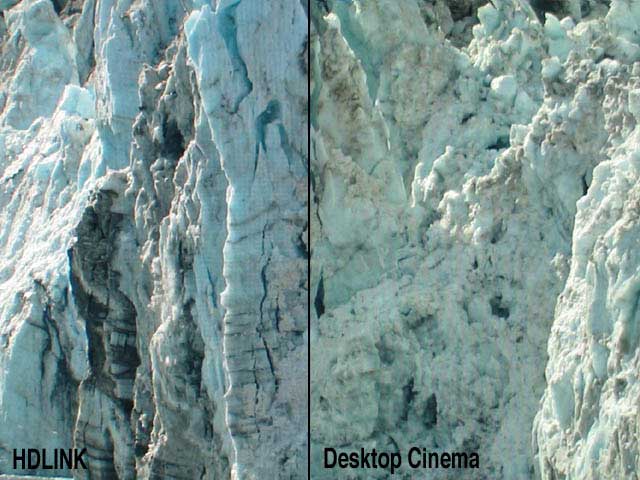
Photographs to try and show the comparison between the HDLink picture and that of the Digital Cinema Desktop Preview. The digital photos were taken with a Canon Powershot G3. The pictures are not a scientific test, but I think you can see the degree of difference in colour and detail between them. The HDLink picture looks visibly superior.Without a CRT HD monitor sitting next to the Cinema Display, it’s hard to judge how accurate the colour representation is, but I can say with some confidence that it’s a lot better than watching HD video on a Cinema Display connected direct to your G5’s graphics card and using the new FCP HD feature of Digital Cinema Desktop Preview. The colours also looked very good when compared with a downconvert to my SD CRT monitor. The image is more dynamic than Digital Cinema Desktop Preview – it literally glows off the screen at you, full of life, with wider range of rich, vibrant colours. White actually looked white! The Digital Cinema Desktop Preview also does not seem to display interlaced video as the HDLink does, perhaps contributing to its soft appearance. One major benefit of using the HDLink for displaying DVCProHD footage is the lack of artifacting that is visible compared to when the footage is viewed inside FCP or via the Digital Cinema Desktop Preview mode. Personally I was quite disappointed at the level of artifacting I saw on Apple’s big screen demos of the new DVCProHD features in FCP HD at it’s NAB launch, especially in shadowy areas of the picture. When viewing via the HDLink I see very little in the way of DVCProHD artifacting, and in particular the 1080i DVCProHD demo footage is stunning to watch via the HDLink. I don’t think that the lack of artifacting has been caused by any softening of the picture though. The picture is supremely sharp and detailed, and normal video noise is visible as a fine grain in the picture, without being exaggerated or softened.

Closeup showing the finer detail of the HDLink and its display of interlacing.

Closeup showing lack of interlace display and lack of the finest of detail on the Desktop Cinema Digital Preview.
The Intensity card is probably all that you need unless you want to capture live video from the component analog outputs of your camera and in which case the Intensity Pro has that added capability.
Regards,
Luke Maslen
Blackmagic Design -

Cboyes
May 9, 2007 at 1:30 pmWow. Thanks a bunch Luke. I wasn’t sure about the Intensity card because it only mentions HDV in its advertising. I think I will pick up an Intensity card.
Chris Boyes
Washtenaw Community College
Ann Arbor, MI -
Luke Maslen
May 10, 2007 at 1:41 amHi Chris,
Our advertising for Intensity doesn’t mention DVCPRO HD we’d usually assume that most DVCPRO HD users were going to connect to a some kind of deck. In your case you’re not doing that as you simply want to capture your material and monitor it prior to distribution via the web. So you don’t need to pay more for connections to a deck and the Intensity should be a perfect fit for your needs.
Regards,
Luke Maslen
Blackmagic Design -
Cboyes
May 11, 2007 at 3:34 pmI just read that the Intensity card doesn’t work on PowerPC Macs. Is that true? If so, that’s a major bummer for me. I was really looking forward to getting the Intensity card.
Chris Boyes
Washtenaw Community College
Ann Arbor, MI -
Cboyes
May 11, 2007 at 3:38 pmPerhaps the HDLink would be best for me? I could hook up the HDTV through the DVI to HDMI connector.
Chris Boyes
Washtenaw Community College
Ann Arbor, MI -
Cboyes
May 11, 2007 at 3:51 pmJust realized I don’t have a way to get into the HDLink without an HD-SDI out. So, is this the end of the inexpensive road unless the G5 bug is fixed?
Chris Boyes
Washtenaw Community College
Ann Arbor, MI
Reply to this Discussion! Login or Sign Up